cancel
Showing results for 
Search instead for 
Did you mean: 

Next up in the FabCon + SQLCon recap series: The roadmap for Microsoft SQL and Maximizing Developer experiences in Fabric. All sessions are available on-demand after the live show. Register now

Reply
Deva002
Frequent Visitor

Running total / cumulative Sales


We have a requirement to create some Running totals in Power BI, we tried several measures but the results were not as expected.

how can we achieve this in Power BI?


Solution to this problem can be used in multiple scenarios like cumulative sales, Amount Invoiced so far, stock levels etc.


Sample Dataset:

Sales

cumulative Sales

10

10

20

30

30

60

40

100


Happy New Year!!

-Deva

1 ACCEPTED SOLUTION

Hi @Deva002,


Sorry for late response cause i just arrived hometown for new year ^_^

One of purposes when using external Dates table to allow you filter another fields in same fact table and the cummulative will be reflected. So if your fact table has only 2 columns  Date and Value, i think you could use ALL method and Date column of that.


Cummulative. = CALCULATE(SUM(TableB[Value]),filter(ALL(TableB), TableB[Date]<=MAX(Dates[Date]) ))

In case you have additional fields and want to filter on that column, you need to handle with ALLEXCEPT, something like this:


Cummulative = CALCULATE(SUM(TableB[Value]),filter(ALLEXCEPT(TableB,TableB[AdditionalField/Dim]), TableB[Date]<=MAX(Dates[Date]) ))

So my recommendation is using Time Pattern as topic (external dates table):smileyvery-happy:


If this works for you please accept it as solution and also like to give KUDOS.

Best regards
Tri Nguyen

View solution in original post

4 REPLIES 4
Baskar
Resident Rockstar
Resident Rockstar

Cool Dude,


We can do , 


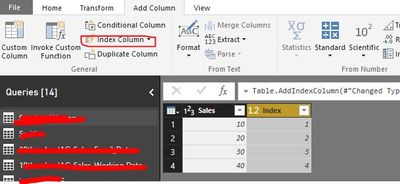
1. Have to add index on your Table using Power Query 1.JPG


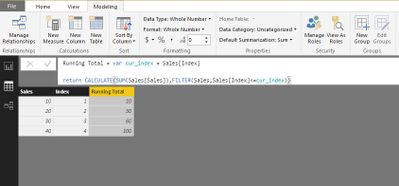
2. Have to create Calculated Column 

2.JPG


Let me know if it is not helping u 


tringuyenminh92
Memorable Member
Memorable Member

Hi @Deva002,


There are some similar questions about cummulative with solution like:

With same approach: Create Dates table -> Create measure with filter All(Dates), Dates[Date] <= Max(Dates[Date])


Please let me know if you need more sample for your situation.

Dear @tringuyenminh92,


Can we have a measure like this without a date dimension? 


-Deva


Hi @Deva002,


Sorry for late response cause i just arrived hometown for new year ^_^

One of purposes when using external Dates table to allow you filter another fields in same fact table and the cummulative will be reflected. So if your fact table has only 2 columns  Date and Value, i think you could use ALL method and Date column of that.


Cummulative. = CALCULATE(SUM(TableB[Value]),filter(ALL(TableB), TableB[Date]<=MAX(Dates[Date]) ))

In case you have additional fields and want to filter on that column, you need to handle with ALLEXCEPT, something like this:


Cummulative = CALCULATE(SUM(TableB[Value]),filter(ALLEXCEPT(TableB,TableB[AdditionalField/Dim]), TableB[Date]<=MAX(Dates[Date]) ))

So my recommendation is using Time Pattern as topic (external dates table):smileyvery-happy:


If this works for you please accept it as solution and also like to give KUDOS.

Best regards
Tri Nguyen

Helpful resources

Announcements
New to Fabric survey Carousel

New to Fabric Survey

If you have recently started exploring Fabric, we'd love to hear how it's going. Your feedback can help with product improvements.

Power BI DataViz World Championships carousel

Power BI DataViz World Championships - June 2026

A new Power BI DataViz World Championship is coming this June! Don't miss out on submitting your entry.

Join our Fabric User Panel

Join our Fabric User Panel

Share feedback directly with Fabric product managers, participate in targeted research studies and influence the Fabric roadmap.

March Power BI Update Carousel

Power BI Community Update - March 2026

Check out the March 2026 Power BI update to learn about new features.