Forum Discussion

 Helper III
Calculating Cumulative Monthly Totals
Hello Power BI Gurus
I am stuck up with a situation, for which I have seen many solutions. However, nothing worked for me as I have more columns in my table. I need to calculate Monthly Cumulative numbers that add up values for each month in respective codes. I have following table structure:
I need a new calculated field that creates cumulative monthly "Actual_KD" filed for each Account Code and Cost Center.
I have tried following formulae but it gives me zero values all the way (TB is my Table name):
Cumulative_Actual =
CALCULATE (
    SUM ( TB'[Actual_KD] ),
    ALL ( 'TB' ),
    'TB'[Month] <= EARLIER ( 'TB'[Month] )
)
Appreciate support of experts
Regards
Waseem, oh i'm sorry for missing in quickly typing. there is misssing filter in the expression:
Cumulative_Actual =
CALCULATE (
    SUM ( 'TB'[Actual_KD] ),
   filter( ALL ( 'Dates' ),
    'Dates'[Date] <= MAX( 'Dates'[Date] ))
)
please kindly try again with calculated measure

18 Replies
- tringuyenminh92
Memorable Member
Hi Waseem,
Instead of using Calculated Column, you could use Calculated Measure:- Created new Dates table: Dates= Calendarauto()
- Making relationship between fact and dates table
- Create calculated measure:
Cumulative_Actual =
CALCULATE (
    SUM ( 'TB'[Actual_KD] ),
    ALL ( 'Dates'),
    'Dates'[Date] <= MAX ( 'Dates'[Date] )
)
Please refer my example as a part of topic: https://community.powerbi.com/t5/Desktop/DAX-Count-of-Stores-that-are-under-the-Average/td-p/100685
In case you still want to go on with Calculated Column, you could try replace method ALL with ALLEXCEPT(TB,columnyouwantfilter1,columnyouwantfilter2)
Please feel free to show your expectation in picture or let me know if you need a sample to clarify any concern. If this works for you please accept it as solution and also like to give KUDOS.
 Waseem
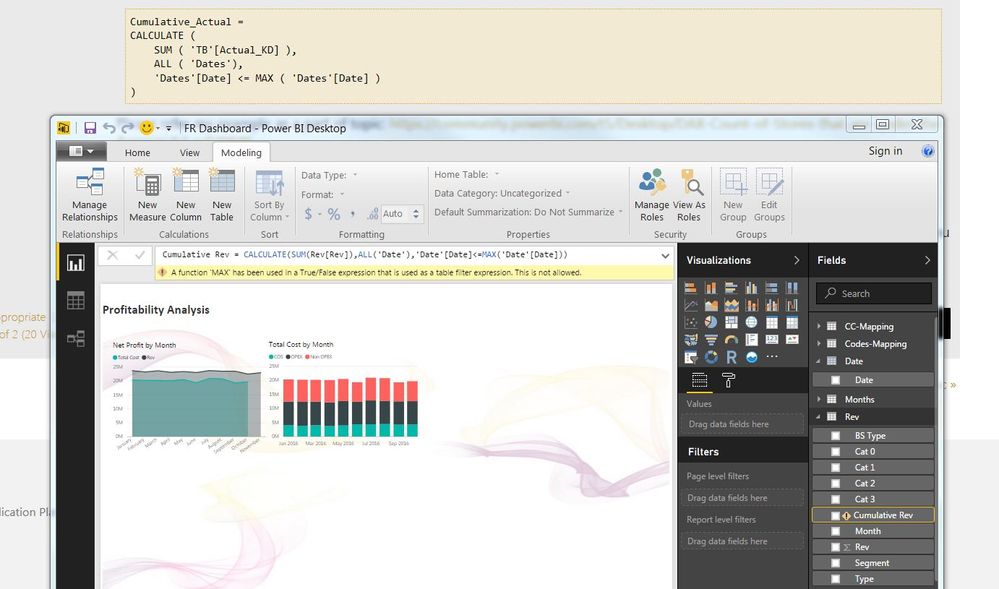
Thanks a lot for your prompt response. I tried to do what you suggested but there was an error prompt. I created both a measure and a column but ended up with same error message. Below is the snapshot of my dashboard. Appreciate your help.
- Waseem
Sorry if it is not legible. The error reads like following:
"A Function MAX has been used in the True/False expression that is used as a Table Filter expression. This is not allowed".
Regards
- tringuyenminh92
Waseem, oh i'm sorry for missing in quickly typing. there is misssing filter in the expression:
Cumulative_Actual =
CALCULATE (
    SUM ( 'TB'[Actual_KD] ),
   filter( ALL ( 'Dates' ),
    'Dates'[Date] <= MAX( 'Dates'[Date] ))
)
please kindly try again with calculated measure
 AnonymousNot applicable
Thank you so much for this input that create measure not column to get the desired result. :) Finally, this got my work done.
 AndreSatziack
Helper I
Hello Guys,
Thanks for all, I resolved this problem with Dax bellow. Best Regards.
New Date Table: Calendar = CALENDAR(MIN(Relatorio_Anual_2017[Criado]),MAX(Relatorio_Anual_2017[Criado])) New Measure: Acumulado = CALCULATE( SUM(Relatorio_Anual_2017[Horas]), FILTER( ALLSELECTED('Calendar'[Date]), 'Calendar'[Date] <= MAX ('Calendar'[Date]) ) )- AndreSatziack
Hello guys,
How are you? I need your help for same problem.
I used same DAX sample, but this not worked for me, can you help me?
I have following table structure.
Thank you very much.
 Raj2891Frequent Visitor
How did you get a dark gray background for your visualisation pane?
 harshaduggiFrequent Visitor
I need a column where it has to show the count as per the MonthNo. Need help Urgent
- Ashish_Mathur
Super User
Hi,
Write this calculated column formula
=month(Data[Month])
Hope this helps.
- harshaduggiFrequent Visitor
sorry i was not clear earlier. how about if the project extends for next year. please see below picture
- Ashish_Mathur
Hi,
This calculated column formula works
=DATEDIFF(CALCULATE(MIN(Table1[Month]),FILTER(Table1,Table1[Project]=EARLIER(Table1[Project]))),Table1[Month],MONTH)+1Hope this helps.