cancel
Showing results for 
Search instead for 
Did you mean: 

Next up in the FabCon + SQLCon recap series: The roadmap for Microsoft SQL and Maximizing Developer experiences in Fabric. All sessions are available on-demand after the live show. Register now

Reply
cbolling
Helper I
Helper I

Returning the Highest Rank Number from the Rank Measure

Hi There,


I have a list of customers that is fluid, and there is a RankX ranking them based on their revenue. Lets say that there are 1 through n customers, I want to take n and multiply it by .2 and then only display customers with rank <= n*0.2. In other words I want to only display the top 20% of my customers based on revenue. What is the best way to do this?

1 ACCEPTED SOLUTION
amitchandak
Super User
Super User

@cbolling ,Not very clear. But I think this case of top percentile.


Refer if these can help


https://blog.enterprisedna.co/implementing-80-20-logic-in-your-power-bi-analysis/
https://forum.enterprisedna.co/t/testing-the-pareto-principle-80-20-rule-in-power-bi-w-dax/459
https://finance-bi.com/power-bi-pareto-analysis/
https://community.powerbi.com/t5/DAX-Commands-and-Tips/Calculate-the-sum-of-the-top-80/td-p/763156


Please provide your feedback comments and advice for new videos
Tutorial Series Dax Vs SQL Direct Query PBI Tips
Appreciate your Kudos.

Share with Power BI Enthusiasts: Full Power BI Video (20 Hours) YouTube
Microsoft Fabric Series 60+ Videos YouTube
Microsoft Fabric Hindi End to End YouTube

View solution in original post

2 REPLIES 2
wdx223_Daniel
Community Champion
Community Champion


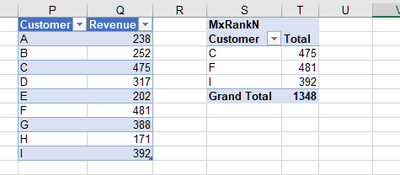
wdx223_Daniel_2-1602575540236.png


MxRankN :=
VAR pct = 0.4
VAR MxRx =
    RANKX (
        ALL ( Sales[Customer] ),
        CALCULATE ( SUM ( Sales[Revenue] ) ),
        MAXX (
            TOPN ( 1, ALL ( Sales[Customer] ), CALCULATE ( SUM ( Sales[Revenue] ) ) ),
            CALCULATE ( SUM ( Sales[Revenue] ) )
        ),
        ASC
    )
VAR n =
    INT ( pct * MxRx )
RETURN
    SUMX (
        VALUES ( Sales[Customer] ),
        IF (
            RANKX ( ALL ( Sales[Customer] ), CALCULATE ( SUM ( Sales[Revenue] ) ),, DESC ) <= n,
            CALCULATE ( SUM ( Sales[Revenue] ) )
        )
    )


amitchandak
Super User
Super User

@cbolling ,Not very clear. But I think this case of top percentile.


Refer if these can help


https://blog.enterprisedna.co/implementing-80-20-logic-in-your-power-bi-analysis/
https://forum.enterprisedna.co/t/testing-the-pareto-principle-80-20-rule-in-power-bi-w-dax/459
https://finance-bi.com/power-bi-pareto-analysis/
https://community.powerbi.com/t5/DAX-Commands-and-Tips/Calculate-the-sum-of-the-top-80/td-p/763156


Please provide your feedback comments and advice for new videos
Tutorial Series Dax Vs SQL Direct Query PBI Tips
Appreciate your Kudos.

Share with Power BI Enthusiasts: Full Power BI Video (20 Hours) YouTube
Microsoft Fabric Series 60+ Videos YouTube
Microsoft Fabric Hindi End to End YouTube

Helpful resources

Announcements
New to Fabric survey Carousel

New to Fabric Survey

If you have recently started exploring Fabric, we'd love to hear how it's going. Your feedback can help with product improvements.

Power BI DataViz World Championships carousel

Power BI DataViz World Championships - June 2026

A new Power BI DataViz World Championship is coming this June! Don't miss out on submitting your entry.

March Power BI Update Carousel

Power BI Community Update - March 2026

Check out the March 2026 Power BI update to learn about new features.