Join us at FabCon Atlanta from March 16 - 20, 2026, for the ultimate Fabric, Power BI, AI and SQL community-led event. Save $200 with code FABCOMM.
Register now!The Power BI Data Visualization World Championships is back! Get ahead of the game and start preparing now! Learn more
Hello Community,
I need to right a measure that generate value based on date range. So basically i've calendar table and data input table.
Data Input
| Start Date | End Date | Amount |
| 1/1/2020 | 12/31/2021 | 100 |
So the requirement is to put this on line chart that has periods from calendar table on x axes and we want a line shows the amount the Amount on every month within that period.
Any ideas other that building a table to spread the amounts of rows?
Solved! Go to Solution.
Hi @MoCPA ,
I suggest you to inactive or remove the relationship between the input table and calendar table. Then create a measure to filter your visual.
Filter =
VAR _START =
SELECTEDVALUE ( 'Data Input'[Start Date] )
VAR _END =
SELECTEDVALUE ( 'Data Input'[End Date] )
RETURN
IF (
MIN ( 'Calendar'[Date] ) >= _START
&& MAX ( 'Calendar'[Date] ) <= _END,
1,
0
)
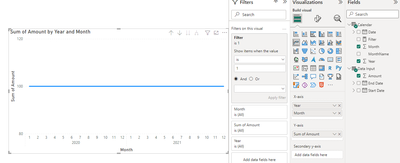
Add this measure into visual level filter and set it to show items when value = 1. Result is a below.
Best Regards,
Rico Zhou
If this post helps, then please consider Accept it as the solution to help the other members find it more quickly.
Hi @MoCPA ,
I suggest you to inactive or remove the relationship between the input table and calendar table. Then create a measure to filter your visual.
Filter =
VAR _START =
SELECTEDVALUE ( 'Data Input'[Start Date] )
VAR _END =
SELECTEDVALUE ( 'Data Input'[End Date] )
RETURN
IF (
MIN ( 'Calendar'[Date] ) >= _START
&& MAX ( 'Calendar'[Date] ) <= _END,
1,
0
)
Add this measure into visual level filter and set it to show items when value = 1. Result is a below.
Best Regards,
Rico Zhou
If this post helps, then please consider Accept it as the solution to help the other members find it more quickly.
@MoCPA , Refer if these approches can help
Measure way
Power BI Dax Measure- Allocate data between Range: https://youtu.be/O653vwLTUzM
https://community.powerbi.com/t5/Community-Blog/How-to-divide-distribute-values-between-start-date-o...
Tables way
https://amitchandak.mediumcom/dax-get-all-dates-between-the-start-and-end-date-8f3dac4ff90b
https://amitchandak.medium.com/power-query-get-all-dates-between-the-start-and-end-date-9ad6a84cf5f2
The Power BI Data Visualization World Championships is back! Get ahead of the game and start preparing now!
Check out the November 2025 Power BI update to learn about new features.
| User | Count |
|---|---|
| 19 | |
| 11 | |
| 9 | |
| 4 | |
| 4 |
| User | Count |
|---|---|
| 35 | |
| 32 | |
| 20 | |
| 12 | |
| 10 |