Don't miss your chance to take the Fabric Data Engineer (DP-600) exam for FREE! Find out how by attending the DP-600 session on April 23rd (pacific time), live or on-demand.
Learn moreNext up in the FabCon + SQLCon recap series: The roadmap for Microsoft SQL and Maximizing Developer experiences in Fabric. All sessions are available on-demand after the live show. Register now
Dear community,
I am more and more getting desparate with the following issue and therefore now turning to you. Until recently I was an Excel power user, but now turned towards PowerBi, which I am mostly very happy about.
The issue at hand is that I want to create a measure that uses the current row value as a reference. More specifically, I want to create a sum across a column for all rows which have a reference value (other column) >= the current row. I found out that this can be done in a "New Column" relatively easily. However, I need a measure as it should be processed further and must be adaptive to filtering in the report.
I attached an examplary table and a screenshot of how I would create that funtionality in Excel (in case it helps).
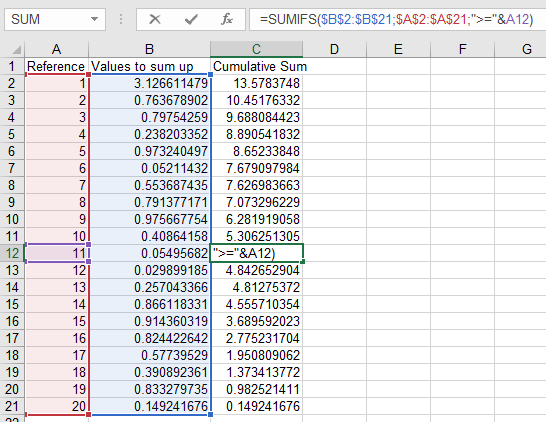
| Reference | Values to sum up | Cumulative Sum |
| 1 | 3.230516107 | 12.24387441 |
| 1 | 0.880767646 | 12.24387441 |
| 1 | 0.940916486 | 12.24387441 |
| 1 | 0.309598663 | 12.24387441 |
| 1 | 0.137565722 | 12.24387441 |
| 2 | 0.920849434 | 6.744509782 |
| 3 | 0.292905447 | 5.823660349 |
| 3 | 0.293494306 | 5.823660349 |
| 3 | 0.619171052 | 5.823660349 |
| 3 | 0.447142839 | 5.823660349 |
| 3 | 0.035413509 | 5.823660349 |
| 3 | 0.02673483 | 5.823660349 |
| 4 | 0.514089092 | 4.108798367 |
| 4 | 0.297866241 | 4.108798367 |
| 4 | 0.656081161 | 4.108798367 |
| 4 | 0.163896406 | 4.108798367 |
| 5 | 0.564305993 | 2.476865465 |
| 5 | 0.796432183 | 2.476865465 |
| 6 | 0.253567742 | 1.11612729 |
| 6 | 0.862559548 | 1.11612729 |
Thanks so much in advance!
Steffen
Solved! Go to Solution.
@Anonymous , try a new measure like
calculate(sum(Table[Values to sum]), filter(allselected(Table), Table[Values to sum] >=max(table[Values to sum])))
or new column like
sumx(filter(Table,Table[Values to sum] >=earlier(table[Values to sum])),[Values to sum])
@amitchandak Thanks a lot!
The "measure"-version is what I was looking for. I replaced the columns within the filter bracket to the "Reference" column and that produces the desired result.
It still feels odd having to use the max() operator just to reference the current row, though.
@Anonymous , try a new measure like
calculate(sum(Table[Values to sum]), filter(allselected(Table), Table[Values to sum] >=max(table[Values to sum])))
or new column like
sumx(filter(Table,Table[Values to sum] >=earlier(table[Values to sum])),[Values to sum])
If you have recently started exploring Fabric, we'd love to hear how it's going. Your feedback can help with product improvements.
A new Power BI DataViz World Championship is coming this June! Don't miss out on submitting your entry.
Share feedback directly with Fabric product managers, participate in targeted research studies and influence the Fabric roadmap.
| User | Count |
|---|---|
| 7 | |
| 6 | |
| 3 | |
| 2 | |
| 2 |
| User | Count |
|---|---|
| 21 | |
| 12 | |
| 9 | |
| 5 | |
| 5 |