Join us at FabCon Atlanta from March 16 - 20, 2026, for the ultimate Fabric, Power BI, AI and SQL community-led event. Save $200 with code FABCOMM.
Register now!The Power BI Data Visualization World Championships is back! Get ahead of the game and start preparing now! Learn more
Hi
I'm trying to work out how to achieve the following in DAX (or Power Query) that I currently do using VBA in excel.
I have a table with data similar to the below:
| Distance From | Distance To | Type |
| 0 | 1 | Red |
| 1 | 2 | Red |
| 2 | 4 | Green |
| 4 | 10 | Green |
| 10 | 13 | Green |
| 13 | 14 | Red |
| 14 | 33 | Red |
| 33 | 40 | Blue |
| 40 | 45 | Green |
| 45 | 46 | Green |
| 46 | 50 | Red |
And need to rationalise it to the below.
Distance From | Distance To | Type |
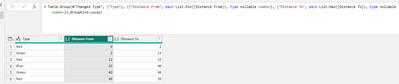
| 0 | 2 | Red |
| 2 | 13 | Green |
| 13 | 33 | Red |
| 33 | 40 | Blue |
| 40 | 46 | Green |
| 46 | 50 | Red |
So currently I do this in VBA by looping through the rows and keeping track of the Min [Distance From] from and Max [Distance To] until the [Type] changes. The data is alway sorted on [Distance From] ascending and the [Distance To] always matches the next rows [Distance From]
Solved! Go to Solution.
let
Source = Table.FromRows(Json.Document(Binary.Decompress(Binary.FromText("i45WMlDSUTIE4qDUFKVYnWgw2wiJD2KbALF7UWpqHlgExDM0QBECcw2NUcVAXEMTZKNBHGNjJBEwxwSk2SmnNBViOohnYopqI4hrYoYqBuKaGsAMiwUA", BinaryEncoding.Base64), Compression.Deflate)), let _t = ((type nullable text) meta [Serialized.Text = true]) in type table [#"Distance From" = _t, #"Distance To" = _t, Type = _t]),
#"Changed Type" = Table.TransformColumnTypes(Source,{{"Distance From", Int64.Type}, {"Distance To", Int64.Type}}),
#"Grouped Rows" = Table.Group(#"Changed Type", {"Type"}, {{"Distance From", each List.Min([Distance From]), type nullable number}, {"Distance To", each List.Max([Distance To]), type nullable number}},GroupKind.Local)
in
#"Grouped Rows"
obligatory credit: @ImkeF
let
Source = Table.FromRows(Json.Document(Binary.Decompress(Binary.FromText("i45WMlDSUTIE4qDUFKVYnWgw2wiJD2KbALF7UWpqHlgExDM0QBECcw2NUcVAXEMTZKNBHGNjJBEwxwSk2SmnNBViOohnYopqI4hrYoYqBuKaGsAMiwUA", BinaryEncoding.Base64), Compression.Deflate)), let _t = ((type nullable text) meta [Serialized.Text = true]) in type table [#"Distance From" = _t, #"Distance To" = _t, Type = _t]),
#"Changed Type" = Table.TransformColumnTypes(Source,{{"Distance From", Int64.Type}, {"Distance To", Int64.Type}}),
#"Grouped Rows" = Table.Group(#"Changed Type", {"Type"}, {{"Distance From", each List.Min([Distance From]), type nullable number}, {"Distance To", each List.Max([Distance To]), type nullable number}},GroupKind.Local)
in
#"Grouped Rows"
obligatory credit: @ImkeF
I always discounted using group. I guess I missed reading up on the GroupKind parameter.
Thanks that worked a treat.
The Power BI Data Visualization World Championships is back! Get ahead of the game and start preparing now!
| User | Count |
|---|---|
| 14 | |
| 5 | |
| 5 | |
| 3 | |
| 3 |
| User | Count |
|---|---|
| 24 | |
| 10 | |
| 10 | |
| 6 | |
| 6 |