cancel
Showing results for 
Search instead for 
Did you mean: 

July 7 - July 17 | Round 2 of the Power BI Dataviz World Championships. Don't miss your chance! Learn more

Reply
slinfoo4
Frequent Visitor

Rationalise Rows

Hi 

I'm trying to work out how to achieve the following in DAX (or Power Query) that I currently do using VBA in excel.

I have a table with data similar to the below:

Distance FromDistance ToType
01Red
12Red
24Green
410Green
1013Green
1314Red
1433Red
3340Blue
4045Green
4546Green
4650Red

And need to rationalise it to the below. 

Distance From

Distance ToType
02Red
213Green
1333Red
3340Blue
4046Green
4650Red


So currently I do this in VBA by looping through the rows and keeping track of the Min [Distance From] from and Max [Distance To] until the [Type] changes. The data is alway sorted on [Distance From] ascending and the [Distance To] always matches the next rows [Distance From]

1 ACCEPTED SOLUTION
lbendlin
Super User
Super User

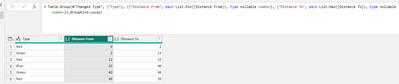
lbendlin_0-1711577119019.png

let
    Source = Table.FromRows(Json.Document(Binary.Decompress(Binary.FromText("i45WMlDSUTIE4qDUFKVYnWgw2wiJD2KbALF7UWpqHlgExDM0QBECcw2NUcVAXEMTZKNBHGNjJBEwxwSk2SmnNBViOohnYopqI4hrYoYqBuKaGsAMiwUA", BinaryEncoding.Base64), Compression.Deflate)), let _t = ((type nullable text) meta [Serialized.Text = true]) in type table [#"Distance From" = _t, #"Distance To" = _t, Type = _t]),
    #"Changed Type" = Table.TransformColumnTypes(Source,{{"Distance From", Int64.Type}, {"Distance To", Int64.Type}}),
    #"Grouped Rows" = Table.Group(#"Changed Type", {"Type"}, {{"Distance From", each List.Min([Distance From]), type nullable number}, {"Distance To", each List.Max([Distance To]), type nullable number}},GroupKind.Local)
in
    #"Grouped Rows"

obligatory credit: @ImkeF 

View solution in original post

2 REPLIES 2
lbendlin
Super User
Super User

lbendlin_0-1711577119019.png

let
    Source = Table.FromRows(Json.Document(Binary.Decompress(Binary.FromText("i45WMlDSUTIE4qDUFKVYnWgw2wiJD2KbALF7UWpqHlgExDM0QBECcw2NUcVAXEMTZKNBHGNjJBEwxwSk2SmnNBViOohnYopqI4hrYoYqBuKaGsAMiwUA", BinaryEncoding.Base64), Compression.Deflate)), let _t = ((type nullable text) meta [Serialized.Text = true]) in type table [#"Distance From" = _t, #"Distance To" = _t, Type = _t]),
    #"Changed Type" = Table.TransformColumnTypes(Source,{{"Distance From", Int64.Type}, {"Distance To", Int64.Type}}),
    #"Grouped Rows" = Table.Group(#"Changed Type", {"Type"}, {{"Distance From", each List.Min([Distance From]), type nullable number}, {"Distance To", each List.Max([Distance To]), type nullable number}},GroupKind.Local)
in
    #"Grouped Rows"

obligatory credit: @ImkeF 

I always discounted using group. I guess I missed reading up on the GroupKind parameter.

Thanks that worked a treat.

Helpful resources

Announcements
FabCon and SQLCon Barcelona 2026

FabCon & SQLCon – Barcelona 2026

Join us in Barcelona for FabCon and SQLCon, the Fabric, Power BI, SQL, and AI community event. Save €200 with code FABCMTY200.

60 days of Data Days Carousel

Data Days 2026

Join Data Days 2026: 60 days of free live/on-demand sessions, challenges, study groups, and certification opportunities.

Power BI DataViz World Championships carousel

Power BI DataViz World Championships - June 2026

A new Power BI DataViz World Championship is coming this June! Don't miss out on submitting your entry.