Join us at FabCon Atlanta from March 16 - 20, 2026, for the ultimate Fabric, Power BI, AI and SQL community-led event. Save $200 with code FABCOMM.
Register now!Get Fabric Certified for FREE during Fabric Data Days. Don't miss your chance! Request now
Hello,
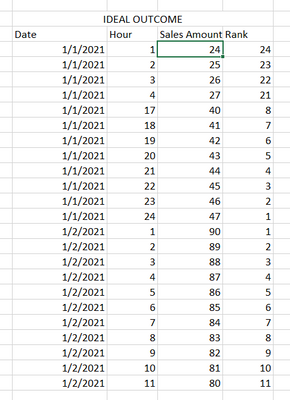
I am trying to find out which hour of the day I am making the most sales. So, I am trying to make a ranking that create a new ranking each day. The column I am trying to create is the "Rank" column (see image below). I am also going to use this column to create other calculated columns. Any help would be greatly appreciated.
I tried doing it using something similar to this (https://community.powerbi.com/t5/Desktop/Creating-a-Ranking-according-to-a-date/m-p/1813762#M705371😞
_Rank measure =
RANKX (
ALLEXCEPT ( 'Table', 'Table'[Date] ),
CALCULATE ( SUM ( 'Table'[Sales] ) ),
,
DESC,
DENSE
)
Solved! Go to Solution.
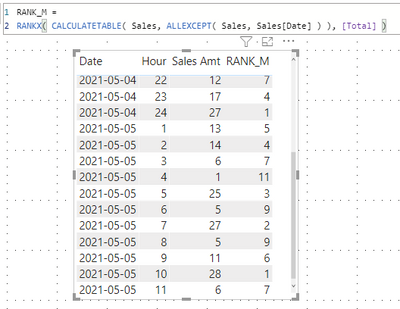
Calculated column solution
Measure solution
| Thanks to the great efforts by MS engineers to simplify syntax of DAX! Most beginners are SUCCESSFULLY MISLED to think that they could easily master DAX; but it turns out that the intricacy of the most frequently used RANKX() is still way beyond their comprehension! |
DAX is simple, but NOT EASY! |
Calculated column solution
Measure solution
| Thanks to the great efforts by MS engineers to simplify syntax of DAX! Most beginners are SUCCESSFULLY MISLED to think that they could easily master DAX; but it turns out that the intricacy of the most frequently used RANKX() is still way beyond their comprehension! |
DAX is simple, but NOT EASY! |
Thank you!
Check out the November 2025 Power BI update to learn about new features.
Advance your Data & AI career with 50 days of live learning, contests, hands-on challenges, study groups & certifications and more!
| User | Count |
|---|---|
| 11 | |
| 9 | |
| 9 | |
| 5 | |
| 4 |
| User | Count |
|---|---|
| 27 | |
| 22 | |
| 20 | |
| 17 | |
| 12 |