cancel
Showing results for 
Search instead for 
Did you mean: 

The Power BI Data Visualization World Championships is back! Get ahead of the game and start preparing now! Learn more

Reply
MCG
Helper I
Helper I

RankX for number of columns

Hi,

I have a simple data set:

category   brand   value

x               a           10

x               b           15

y               c            20

y               d            25


I need to create ONE measure that will give me ranking for category and brand but shown in two separate tables:

cat   value   rank

x      35       2

y      45       1


brand value   rank

a        10       4

b        15       3

... for the rest brands


Is it possible via one RankX measure?

thanks

Mcg

1 ACCEPTED SOLUTION
AlB
Community Champion
Community Champion

@MCG 

Sorry, hadn't read properly.


Rank measure V2 =
SWITCH (
    TRUE (),
    ISFILTERED ( Table1[category] ), RANKX ( ALL ( Table1[category] ), CALCULATE ( SUM ( Table1[value] ) ) ),
    ISFILTERED ( Table1[brand] ), RANKX ( ALL ( Table1[brand] ), CALCULATE ( SUM ( Table1[value] ) ) )
)


Please mark the question solved when done and consider giving a thumbs up if posts are helpful.

Contact me privately for support with any larger-scale BI needs, tutoring, etc.

Cheers 

SU18_powerbi_badge

View solution in original post

6 REPLIES 6
AlB
Community Champion
Community Champion

@MCG 

Sorry, hadn't read properly.


Rank measure V2 =
SWITCH (
    TRUE (),
    ISFILTERED ( Table1[category] ), RANKX ( ALL ( Table1[category] ), CALCULATE ( SUM ( Table1[value] ) ) ),
    ISFILTERED ( Table1[brand] ), RANKX ( ALL ( Table1[brand] ), CALCULATE ( SUM ( Table1[value] ) ) )
)


Please mark the question solved when done and consider giving a thumbs up if posts are helpful.

Contact me privately for support with any larger-scale BI needs, tutoring, etc.

Cheers 

SU18_powerbi_badge

exactly what i was looking for:)

perfect!

greta thanks

mcg


CNENFRNL
Community Champion
Community Champion

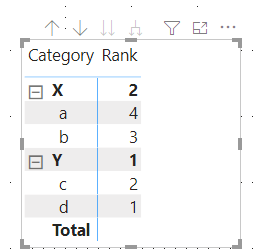
Hi, @MCG , you might want to try to further integrate rankings this way,

Rank =
SWITCH (
    TRUE (),
    ISINSCOPE ( Table1[brand] ),
        RANKX (
            ALL ( Table1[brand] ),
            CALCULATE ( SUM ( Table1[value] ), ALL ( Table1[Category] ) )
        ),
    ISINSCOPE ( Table1[category] ), RANKX ( ALL ( Table1[category] ), CALCULATE ( SUM ( Table1[value] ) ) )
)

Screenshot 2020-12-02 224039.png


Thanks to the great efforts by MS engineers to simplify syntax of DAX! Most beginners are SUCCESSFULLY MISLED to think that they could easily master DAX; but it turns out that the intricacy of the most frequently used RANKX() is still way beyond their comprehension!

DAX is simple, but NOT EASY!

That is also nice solution:)

I will keep it in mind

thx

Mcg

AlB
Community Champion
Community Champion

Hi @MCG 

For your first visual:

Rank measure = 
RANKX(ALL(Table1[category]), CALCULATE(SUM(Table1[value])))

For the second:

Rank measure 2 = 
RANKX(ALL(Table1[brand]), CALCULATE(SUM(Table1[value])))


Please mark the question solved when done and consider giving a thumbs up if posts are helpful.

Contact me privately for support with any larger-scale BI needs, tutoring, etc.

Cheers 

SU18_powerbi_badge


Thanks:)

That is what I also calculated...

What i wanted to achieve is to get same result in one measure...

br

Mcg

Helpful resources

Announcements
Power BI DataViz World Championships

Power BI Dataviz World Championships

The Power BI Data Visualization World Championships is back! Get ahead of the game and start preparing now!

November Power BI Update Carousel

Power BI Monthly Update - November 2025

Check out the November 2025 Power BI update to learn about new features.

FabCon Atlanta 2026 carousel

FabCon Atlanta 2026

Join us at FabCon Atlanta, March 16-20, for the ultimate Fabric, Power BI, AI and SQL community-led event. Save $200 with code FABCOMM.