cancel
Showing results for 
Search instead for 
Did you mean: 

The Power BI Data Visualization World Championships is back! Get ahead of the game and start preparing now! Learn more

Reply
adii
Helper I
Helper I

Problem with legend and measure in plot

Hello 


I have a little problem with line chart and measure. 

I have plot with measure (sum of values) on Y Y axis  and when I put on legend name of country I see couple of line depends which country I chosen on slicer , so it's right . But when I want put on plot another measure (Average of values for all country ) I couldnt do that . 

so how solve that problem ? 

I see solve the problem . I can make a lot of separate measure( calculate ...., Filter =Spain... etc )  for each country but it will be tough, 


someone could help ? 

1 ACCEPTED SOLUTION
v-jianboli-msft
Community Support
Community Support

Hi @adii ,


Based on your description, I have created a simple sample:
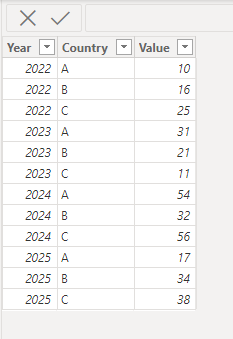
vjianbolimsft_0-1685337985817.png

Please try:

First create a new table like this:

let
    Source = Table.FromRows(Json.Document(Binary.Decompress(Binary.FromText("Vc6xDcAwCETRXahdGDBJ2iRjWOy/hk1ko0txzZO+oHeSKkKF7jmu5CXlCTlQ3jmxLboqZZSo5CdRcUpblTWUqFRQorK8bvvDE+WrGkpUepH7AA==", BinaryEncoding.Base64), Compression.Deflate)), let _t = ((type nullable text) meta [Serialized.Text = true]) in type table [Year = _t, Legend = _t, Value = _t]),
    #"Changed Type" = Table.TransformColumnTypes(Source,{{"Year", Int64.Type}, {"Legend", type text}, {"Value", Int64.Type}}),
    #"Removed Other Columns" = Table.SelectColumns(#"Changed Type",{"Legend"}),
    #"Removed Duplicates" = Table.Distinct(#"Removed Other Columns"),
    #"Added Custom" = Table.AddColumn(#"Removed Duplicates", "Custom", each {_[Legend],"Average"}),
    #"Expanded Custom" = Table.ExpandListColumn(#"Added Custom", "Custom"),
    #"Renamed Columns" = Table.RenameColumns(#"Expanded Custom",{{"Legend", "Country"}})
in
    #"Renamed Columns"
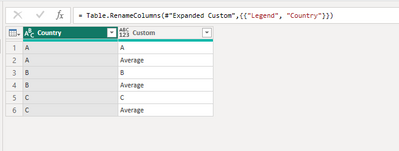
vjianbolimsft_1-1685338019777.png

Then build relationship between the two tables:

vjianbolimsft_2-1685338081143.png

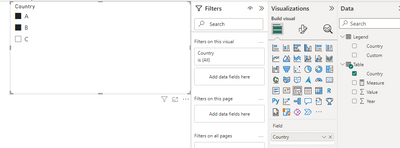
Create a slicer:

vjianbolimsft_3-1685338123862.png


Apply the measure to the line chart:

Measure = 
var _a = ALLSELECTED('Table'[Country])
return 
IF(SELECTEDVALUE(Legend[Custom])="Average",CALCULATE(AVERAGE('Table'[Value]),FILTER(ALL('Table'),[Year]=SELECTEDVALUE('Table'[Year]))),SUM('Table'[Value]))

Final output:
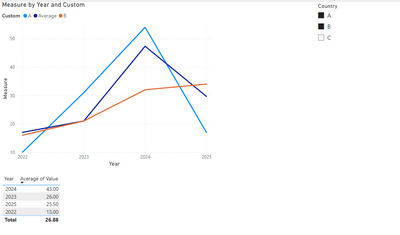
vjianbolimsft_4-1685338177987.png

Best Regards,

Jianbo Li

If this post helps, then please consider Accept it as the solution to help the other members find it more quickly.

View solution in original post

1 REPLY 1
v-jianboli-msft
Community Support
Community Support

Hi @adii ,


Based on your description, I have created a simple sample:

vjianbolimsft_0-1685337985817.png

Please try:

First create a new table like this:

let
    Source = Table.FromRows(Json.Document(Binary.Decompress(Binary.FromText("Vc6xDcAwCETRXahdGDBJ2iRjWOy/hk1ko0txzZO+oHeSKkKF7jmu5CXlCTlQ3jmxLboqZZSo5CdRcUpblTWUqFRQorK8bvvDE+WrGkpUepH7AA==", BinaryEncoding.Base64), Compression.Deflate)), let _t = ((type nullable text) meta [Serialized.Text = true]) in type table [Year = _t, Legend = _t, Value = _t]),
    #"Changed Type" = Table.TransformColumnTypes(Source,{{"Year", Int64.Type}, {"Legend", type text}, {"Value", Int64.Type}}),
    #"Removed Other Columns" = Table.SelectColumns(#"Changed Type",{"Legend"}),
    #"Removed Duplicates" = Table.Distinct(#"Removed Other Columns"),
    #"Added Custom" = Table.AddColumn(#"Removed Duplicates", "Custom", each {_[Legend],"Average"}),
    #"Expanded Custom" = Table.ExpandListColumn(#"Added Custom", "Custom"),
    #"Renamed Columns" = Table.RenameColumns(#"Expanded Custom",{{"Legend", "Country"}})
in
    #"Renamed Columns"

vjianbolimsft_1-1685338019777.png

Then build relationship between the two tables:

vjianbolimsft_2-1685338081143.png

Create a slicer:

vjianbolimsft_3-1685338123862.png


Apply the measure to the line chart:

Measure = 
var _a = ALLSELECTED('Table'[Country])
return 
IF(SELECTEDVALUE(Legend[Custom])="Average",CALCULATE(AVERAGE('Table'[Value]),FILTER(ALL('Table'),[Year]=SELECTEDVALUE('Table'[Year]))),SUM('Table'[Value]))

Final output:

vjianbolimsft_4-1685338177987.png

Best Regards,

Jianbo Li

If this post helps, then please consider Accept it as the solution to help the other members find it more quickly.

Helpful resources

Announcements
Power BI DataViz World Championships

Power BI Dataviz World Championships

The Power BI Data Visualization World Championships is back! Get ahead of the game and start preparing now!

December 2025 Power BI Update Carousel

Power BI Monthly Update - December 2025

Check out the December 2025 Power BI Holiday Recap!

FabCon Atlanta 2026 carousel

FabCon Atlanta 2026

Join us at FabCon Atlanta, March 16-20, for the ultimate Fabric, Power BI, AI and SQL community-led event. Save $200 with code FABCOMM.