Share feedback directly with Fabric product managers, participate in targeted research studies and influence the Fabric roadmap.
Sign up nowGet Fabric certified for FREE! Don't miss your chance! Learn more
Hi,
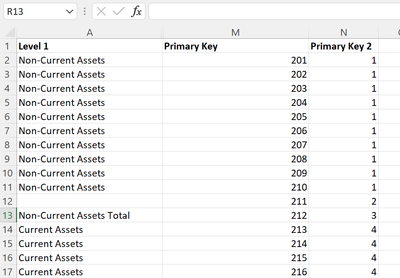
I´m trying to sort "Level 1" value based on the value in "Primary Key" but I´ve also tried "Primary Key 2" without and success.
Only get this error message: There can´t be more than one value in "Level 1 Order" for the same value in "Level 1".
Regards:
Niclas
Hi @Anonymous
Thanks for reaching out to us.
>>I´m trying to sort "Level 1" value based on the value in "Primary Key" but I´ve also tried "Primary Key 2" without and success.
where are you trying to sort column? in Excel or in Power BI Desktop?
Best Regards,
Community Support Team _Tang
If this post helps, please consider Accept it as the solution to help the other members find it more quickly.
@Anonymous , I think Primary Key 2 should work. In not Create a new column like this and try to sort on that
if(isblank([Lavel1], blank(), [Primary Key 2])
Use this new column
If you love stickers, then you will definitely want to check out our Community Sticker Challenge!
Check out the January 2026 Power BI update to learn about new features.
| User | Count |
|---|---|
| 7 | |
| 4 | |
| 4 | |
| 3 | |
| 2 |
| User | Count |
|---|---|
| 15 | |
| 9 | |
| 9 | |
| 7 | |
| 5 |