Join us at FabCon Atlanta from March 16 - 20, 2026, for the ultimate Fabric, Power BI, AI and SQL community-led event. Save $200 with code FABCOMM.
Register now!The Power BI Data Visualization World Championships is back! Get ahead of the game and start preparing now! Learn more
Hi,
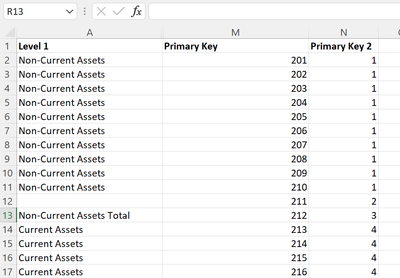
I´m trying to sort "Level 1" value based on the value in "Primary Key" but I´ve also tried "Primary Key 2" without and success.
Only get this error message: There can´t be more than one value in "Level 1 Order" for the same value in "Level 1".
Regards:
Niclas
Hi @Anonymous
Thanks for reaching out to us.
>>I´m trying to sort "Level 1" value based on the value in "Primary Key" but I´ve also tried "Primary Key 2" without and success.
where are you trying to sort column? in Excel or in Power BI Desktop?
Best Regards,
Community Support Team _Tang
If this post helps, please consider Accept it as the solution to help the other members find it more quickly.
@Anonymous , I think Primary Key 2 should work. In not Create a new column like this and try to sort on that
if(isblank([Lavel1], blank(), [Primary Key 2])
Use this new column
The Power BI Data Visualization World Championships is back! Get ahead of the game and start preparing now!
| User | Count |
|---|---|
| 19 | |
| 12 | |
| 10 | |
| 4 | |
| 4 |
| User | Count |
|---|---|
| 32 | |
| 28 | |
| 19 | |
| 11 | |
| 10 |