Join us at FabCon Atlanta from March 16 - 20, 2026, for the ultimate Fabric, Power BI, AI and SQL community-led event. Save $200 with code FABCOMM.
Register now!The Power BI Data Visualization World Championships is back! Get ahead of the game and start preparing now! Learn more
Hello , i have to build a report , from data wich is manually asign the week (no date column , and sometimes with 6 weeks)
That makes impossible use a date table
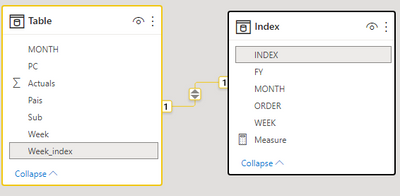
I figured to use a index table and relate to the data table creating a index and creating a order column to set the order of the weeks by month and year
What im having trouble is to get the data in a Week over Week format ,
Example
im in the week 4 in december and i like to get the data for last week using the index table and order column
i tried to use filter and all , but when i put the measure in the table it shows blank
Attached is the example PBIX
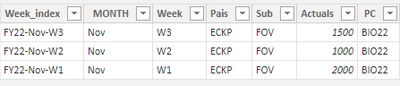
But this is a sample of the data table
| week_index | MONTH | week | pais | sub | actuals | pc |
| FY22-Nov-W2 | Nov | W2 | ECKP | FOV | 1000 | BIO22 |
| FY22-Nov-W1 | Nov | W1 | ECKP | FOV | 2000 | BIO22 |
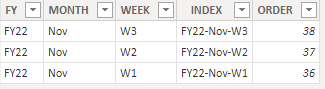
and this is the sample of the index table i created
| FY | MONTH | WEEK | INDEX | ORDER |
| FY22 | Nov | W2 | FY22-Nov-W2 | 37 |
| FY22 | Nov | W1 | FY22-Nov-W1 | 36 |
What i like to archieve is when i select a week in a filter and a month in actuals -1 i get the value from last week :
| PC | ACTUALS (selected in filter nov , w2) | ACTUALS -1 (last week) measure??? |
| BIO22 | 1000 | 2000 |
Solved! Go to Solution.
Hi @Anonymous ,
According to your description, you want to get the last week's actual by the week index filter, here's my solution.
This is my sample data.
This is my measure.
Measure =
CALCULATE (
MAX ( 'Table'[Actuals] ),
FILTER ( ALL ( 'Index' ), 'Index'[ORDER] = MAX ( 'Index'[ORDER] ) - 1 )
)
Get the expected result.
I attach my sample below for reference.
Best Regards,
Community Support Team _ kalyj
If this post helps, then please consider Accept it as the solution to help the other members find it more quickly.
Hi @Anonymous ,
According to your description, you want to get the last week's actual by the week index filter, here's my solution.
This is my sample data.
This is my measure.
Measure =
CALCULATE (
MAX ( 'Table'[Actuals] ),
FILTER ( ALL ( 'Index' ), 'Index'[ORDER] = MAX ( 'Index'[ORDER] ) - 1 )
)
Get the expected result.
I attach my sample below for reference.
Best Regards,
Community Support Team _ kalyj
If this post helps, then please consider Accept it as the solution to help the other members find it more quickly.
Hi @Anonymous
Please see this link:
https://www.vahiddm.com/post/weekly-time-intelligence-dax
If this post helps, please consider accepting it as the solution to help the other members find it more quickly.
Appreciate your Kudos!!
LinkedIn: www.linkedin.com/in/vahid-dm/
@Anonymous , refer if my WOW blog can help
Power BI — Week on Week and WTD
https://medium.com/@amitchandak.1978/power-bi-wtd-questions-time-intelligence-4-5-98c30fab69d3
https://community.powerbi.com/t5/Community-Blog/Week-Is-Not-So-Weak-WTD-Last-WTD-and-This-Week-vs-Last-Week/ba-p/1051123
https://www.youtube.com/watch?v=pnAesWxYgJ8
measure example using week rank in a date table
This Week = CALCULATE(sum('Table'[Qty]), FILTER(ALL('Date'),'Date'[Week Rank]=max('Date'[Week Rank])))
Last Week = CALCULATE(sum('Table'[Qty]), FILTER(ALL('Date'),'Date'[Week Rank]=max('Date'[Week Rank])-1))
new columns in date table
new columns
Week Start date = 'Date'[Date]+-1*WEEKDAY('Date'[Date],2)+1
Week End date = 'Date'[Date]+ 7-1*WEEKDAY('Date'[Date],2)
Week Rank = RANKX(all('Date'),'Date'[Week Start date],,ASC,Dense)
OR
Week Rank = RANKX(all('Date'),'Date'[Year Week],,ASC,Dense) //YYYYWW format
Hello ,thank you for you answer , but is not what i asked , i dont have a date table , because the data has no date field
The field used to relate the data and the index is the week_index field , that is because that information comes from the folder where the files are hosted
EX :
with powerquery , when i get the data i use the folder name ( FY , Month, Week) to order the data in time
The Power BI Data Visualization World Championships is back! Get ahead of the game and start preparing now!
Check out the November 2025 Power BI update to learn about new features.
| User | Count |
|---|---|
| 20 | |
| 11 | |
| 10 | |
| 4 | |
| 4 |
| User | Count |
|---|---|
| 34 | |
| 31 | |
| 19 | |
| 12 | |
| 11 |