Join us at FabCon Atlanta from March 16 - 20, 2026, for the ultimate Fabric, Power BI, AI and SQL community-led event. Save $200 with code FABCOMM.
Register now!The Power BI Data Visualization World Championships is back! Get ahead of the game and start preparing now! Learn more
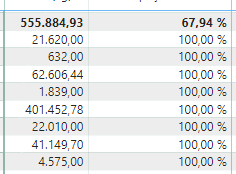
I am in doubt as to how to perform percentages when I go to the next level of drill down in my matrix, the first line was ok, but when I go down the level, 100% is displayed in all data.
My base formula is:
Total Sales Underline = CALCULATE([Sale Qty Weight KG], ALLSELECTED('Item'[Underline - Name]))% Share Underlines = DIVIDE([Sales Qty Weight KG], [Total Sales Underlines])but there are other levels that need the percentage. Can someone help me?
how I use the other lines, like:
Item [Group - Name]
Item - Description [Description]
Solved! Go to Solution.
hi @Anonymous
try like:
% Share Underlines =
DIVIDE(
[Sales Qty Weight KG],
CALCULATE(
[Sale Qty Weight KG],
ALLSELECTED('Item'[Description])
)
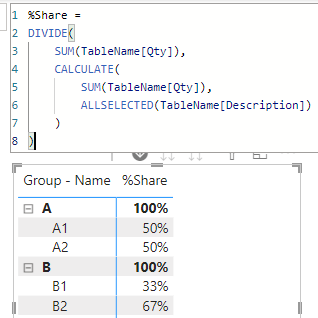
Tried to simulate your case. Supposing your table looks like:
then try to plot the matrix with a measure like:
%Share =
DIVIDE(
SUM(TableName[Qty]),
CALCULATE(
SUM(TableName[Qty]),
ALLSELECTED(TableName[Description])
)
)it worked like:
hi @Anonymous
try like:
% Share Underlines =
DIVIDE(
[Sales Qty Weight KG],
CALCULATE(
[Sale Qty Weight KG],
ALLSELECTED('Item'[Description])
)
Tried to simulate your case. Supposing your table looks like:
then try to plot the matrix with a measure like:
%Share =
DIVIDE(
SUM(TableName[Qty]),
CALCULATE(
SUM(TableName[Qty]),
ALLSELECTED(TableName[Description])
)
)it worked like:
Good morning,
It worked, thank you very much!
In this case, I used the formula as:
% Participation Underlines = DIVIDE(
[Sale Qty Weight KG],
CALCULATE([Sale Qty Weight KG],
ALLSELECTED('Item - Description'[Item - Description]), ALLSELECTED('Item'[Group - Name]), ALLSELECTED('Item'[Underline - Name])
))
What happended when you add Item [Group - Name]
Item - Description [Description] in the this statement? Like;
ALLSELECTED('Item'[Underline - Name],Item [Group - Name])
Proud to be a Super User!
The Power BI Data Visualization World Championships is back! Get ahead of the game and start preparing now!
Check out the November 2025 Power BI update to learn about new features.
| User | Count |
|---|---|
| 20 | |
| 10 | |
| 9 | |
| 4 | |
| 4 |
| User | Count |
|---|---|
| 33 | |
| 31 | |
| 19 | |
| 12 | |
| 11 |