I'm working on a sales report that has 3 potential levels of a hierarchy. Sales can occur at all levels. Levels are Area Manager, Manager, Associate. I've built all the level functions into my table (flattened). I've built the paths and depths. I've read everything I can find, but I can't see to figure out how to show a sales amount for a "parent", without showing blanks for every level, and preferably I'd like to see the parent label repeated, instead of "blank". This is in Power Pivot - but it is the same problem in BI. The link is Example Workbook a sample of my problem.
Annabel (an Area Manager) has 3 managers under her (and no associates under them).
Bill (Area Manager) has 2 managers (Brad and Julie). Brad has 2 associates. Julie has none.
Annabel has made some sales, and Brad has made some sales. Bill hasn't.
Here is side by side of what I get on left that allows me to show Annabels individual contribution - forces every level to drill all the way to level 3, even though there's no child. I'd also like the parent level label to repeat. On the right is how I would like the table to look as I drill from 1 to 3.
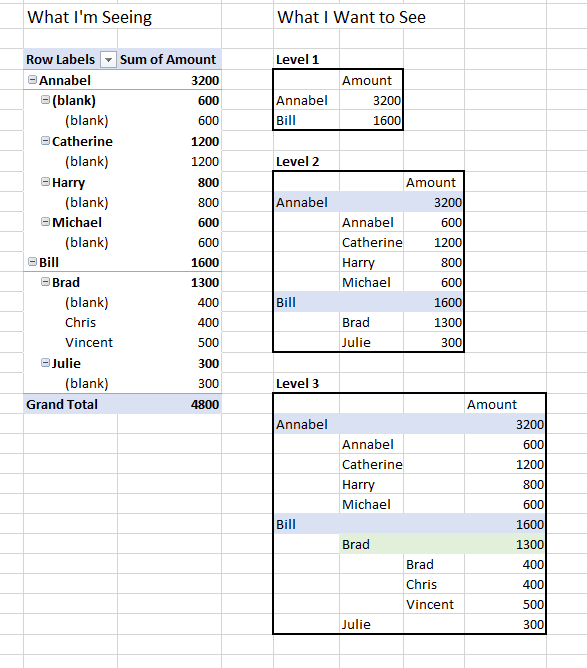
I've done several formulas where you can hide blanks if row depth is less than browse depth, but then I don't see Annabel's sales at all. The sum of the children doesn't equal the total for Annabel. Her amount is never displayed.
This has been making me crazy! All ideas welcome.
Thank you.


