Join us at FabCon Atlanta from March 16 - 20, 2026, for the ultimate Fabric, Power BI, AI and SQL community-led event. Save $200 with code FABCOMM.
Register now!The Power BI Data Visualization World Championships is back! Get ahead of the game and start preparing now! Learn more
COMO PUEDO SACAR EL PROMEDIO DESDE EL MES DE SEPTIEMBRE DEL AÑO 2022 A SEPTIEMBRE DEL 2023 EXLUYENDO LOS 0 O NULL.
Solved! Go to Solution.
Hi @REPORTES_WILSON ,
According to your description, here are my steps you can follow as a solution.
(1) This is my test data.
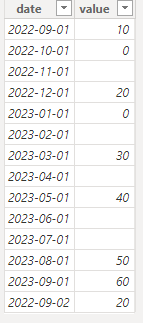
(2) We can create a measure.
Measure =
var _a=CALCULATE(SUM('Table'[value]),FILTER(ALL('Table'),'Table'[date]<=DATE(2023,9,30) && 'Table'[date] >=DATE(2022,9,1)))
var _b=ADDCOLUMNS(ALL('Table'),"Year",YEAR('Table'[date]),"Month",MONTH('Table'[date]))
var _c= SUMMARIZE(_b,[Year],[Month],"sum",SUM('Table'[value]))
var _d=COUNTROWS(FILTER(_c,[sum]<>0 && [sum] <> BLANK()))
return DIVIDE(_a,_d)
(3) Then the result is as follows.
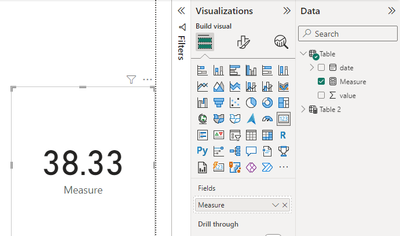
If the above one can't help you get the desired result, please provide some sample data in your tables (exclude sensitive data) with Text format and your expected result with backend logic and special examples. It is better if you can share a simplified pbix file. Thank you.
Best Regards,
Neeko Tang
If this post helps, then please consider Accept it as the solution to help the other members find it more quickly.
Hi @REPORTES_WILSON ,
According to your description, here are my steps you can follow as a solution.
(1) This is my test data.
(2) We can create a measure.
Measure =
var _a=CALCULATE(SUM('Table'[value]),FILTER(ALL('Table'),'Table'[date]<=DATE(2023,9,30) && 'Table'[date] >=DATE(2022,9,1)))
var _b=ADDCOLUMNS(ALL('Table'),"Year",YEAR('Table'[date]),"Month",MONTH('Table'[date]))
var _c= SUMMARIZE(_b,[Year],[Month],"sum",SUM('Table'[value]))
var _d=COUNTROWS(FILTER(_c,[sum]<>0 && [sum] <> BLANK()))
return DIVIDE(_a,_d)
(3) Then the result is as follows.
If the above one can't help you get the desired result, please provide some sample data in your tables (exclude sensitive data) with Text format and your expected result with backend logic and special examples. It is better if you can share a simplified pbix file. Thank you.
Best Regards,
Neeko Tang
If this post helps, then please consider Accept it as the solution to help the other members find it more quickly.

The Power BI Data Visualization World Championships is back! Get ahead of the game and start preparing now!
| User | Count |
|---|---|
| 14 | |
| 7 | |
| 4 | |
| 4 | |
| 3 |
| User | Count |
|---|---|
| 23 | |
| 10 | |
| 10 | |
| 6 | |
| 5 |