Join us at FabCon Atlanta from March 16 - 20, 2026, for the ultimate Fabric, Power BI, AI and SQL community-led event. Save $200 with code FABCOMM.
Register now!Get Fabric Certified for FREE during Fabric Data Days. Don't miss your chance! Request now
Hi all,
i know there are several thread about this topic but still the solution suggested does not work for me.
I have a PQ / Power Pivot model which uses as main sources other excel file in which i have the transactions DB (fct) and the supporting tables (dim).
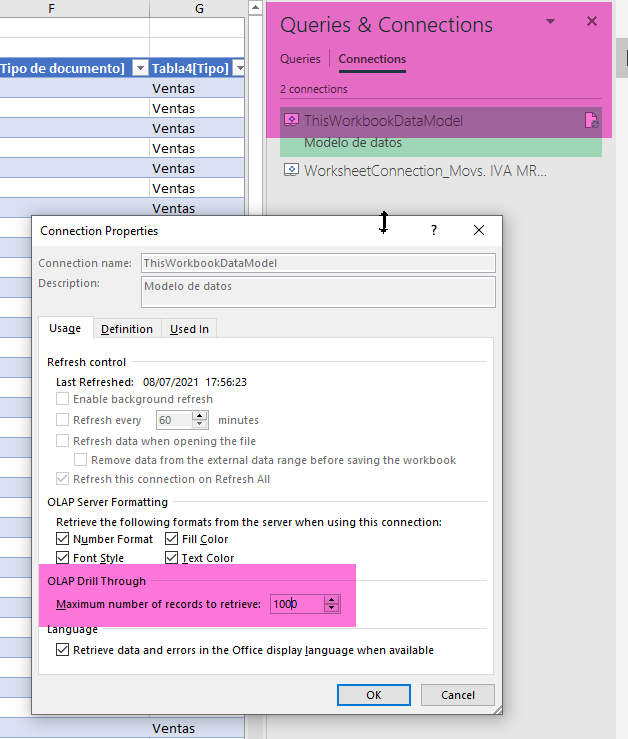
If a create a pivot table using as source the datamodel i am able to retrieve only the first 1000 rows (the function is greyed out)
is there a solution?
thanks for the support
Luca
Hi @LucaA ,
Not sure what you tried so far. See if this can help you:
Connections > "ThisWorkbookDataModel" > Properties > "Max. number of records to retrieve" should not be greyed out here.
my OLAP Drill through is not active
Phong_Le
Nha Trang,Viet Nam
Dear @Payeras_BI ,
My problem is that even if the datamodel works perfectly, if i open "Connection" window i am not able to see any connection and i dont know how to make it appear again. I saw online this is a common problem, i would like to understand how to make "Thisworkbookdatamodel" connection appear again. Once it appears your solution works but my problem is at a previous step.
do you have any idea?
thanks
Luca
Check out the November 2025 Power BI update to learn about new features.
Advance your Data & AI career with 50 days of live learning, contests, hands-on challenges, study groups & certifications and more!
| User | Count |
|---|---|
| 11 | |
| 9 | |
| 9 | |
| 6 | |
| 5 |
| User | Count |
|---|---|
| 27 | |
| 22 | |
| 19 | |
| 17 | |
| 11 |