Join us at FabCon Atlanta from March 16 - 20, 2026, for the ultimate Fabric, Power BI, AI and SQL community-led event. Save $200 with code FABCOMM.
Register now!The Power BI Data Visualization World Championships is back! Get ahead of the game and start preparing now! Learn more
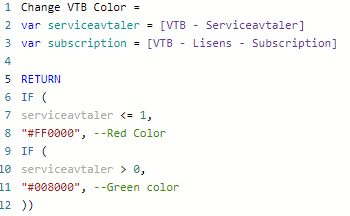
Hey, i am running into a problem when i need to make a conditional formatting setting, but i have 15 measures for each row in a table. I have tried the measure below, but it only works for the measure called "Serviceavtaler", i also want the exact same for Subsription, but it only allows me to do 2 ifs in the return. Anyone have any idea?
@Robin96 Try using a SWITCH(TRUE(),...) statement instead of nested IF statements.
SWITCH(TRUE(),
serviceavtaler <= 1, "#FF0000",
servicevtaler > 0, "#008000",
<next condition>, <next value>,
...,
<default value>
)
Hey @Greg_Deckler
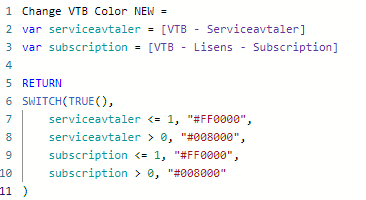
I tried your solution, but it looks like the first condition is met in the first row, so it applies that expression to the whole table. i am trying something like this without any luck:
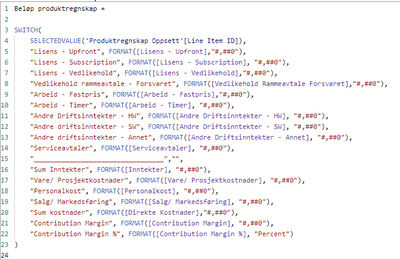
i want it to change color based on the value in the row level. Here is a picture of the measure for the table Is there any way to color format in here??:
@Robin96 Right, the first condition that is met is what is returned. Note, that would be similar to nested IF statemetns. So, you will need additional conditions perhaps using && or something else to distinguish what things get what colors. Hard to say more as I don't know all the business rules.
The Power BI Data Visualization World Championships is back! Get ahead of the game and start preparing now!
| User | Count |
|---|---|
| 15 | |
| 8 | |
| 4 | |
| 4 | |
| 3 |
| User | Count |
|---|---|
| 23 | |
| 10 | |
| 10 | |
| 6 | |
| 5 |