cancel
Showing results for 
Search instead for 
Did you mean: 

We've captured the moments from FabCon & SQLCon that everyone is talking about, and we are bringing them to the community, live and on-demand. Starts on April 14th. Register now

Reply
LizK75
Frequent Visitor

Need to show Maxx Value with Filter avec Concatenate

Hello,


Table = Resume

LabelValueColorPlayerID
Stress5Yellow1
Emotion4Yellow1
TOPS10Green1
Stress4Yellow2
Emotion8Green2
TOPS2Yellow2
Stress3Red3
Emotion6Yellow3
TOPS1Red3


I want to display label(s) that has the max Yellow by concatening them

LabelColorCountColor
StressYellow2
EmotionYellow2
EmotionGreen1
TOPSYellow1
TOPSRed1
TOPSGreen1


Stress, Emotion


YellowLabel = 
VAR YellowLabels =
    FILTER(
        Resume,
        Resume[Color] = "Yellow"
    )
VAR MaxYellowCount =
CALCULATE (MAXX (
    SUMMARIZE (
        Resume,
        Resume[label],
        "Count", CALCULATE(COUNTROWS (Resume))
    ),
    [Count]
)
,ALLEXCEPT(Resume, Resume[Color]))


VAR MaxYellowLabels =
    CONCATENATEX(
        FILTER(
            SUMMARIZE(
                YellowLabels,
                Resume[Label],
                "YellowCount", CALCULATE(COUNTROWS(YellowLabels))
            ),
            [YellowCount] = MaxYellowCount
        ),
        Resume[Label],
        ", "
    )
RETURN
    MaxYellowLabels


it shows blank when I use a card visualization.

maybe there is a simpler way to do it.
thank you for your help

1 ACCEPTED SOLUTION
Anonymous
Not applicable

Hi @LizK75 ,


Using variables to store is not convenient for observation.


To achieve your needs, my approach is:


First, create a Table using New Table:

Yellowtable = FILTER('Resume','Resume'[Color] = "Yellow")


Create a calculated column to calculate the number of each Label. It is not convenient to use measure for row-by-row comparison.

Label Count = CALCULATE(COUNTROWS('Yellowtable'), ALLEXCEPT('Yellowtable', 'Yellowtable'[Label]))


Finally, create a measure to display the Label name with the largest number of Labels when Color = Yellow.

MaxLabelDisplay = 
VAR MaxCount = CALCULATE(MAX('Yellowtable'[Label Count]), ALLEXCEPT('Yellowtable', 'Yellowtable'[Label]))
RETURN
CALCULATE(
    CONCATENATEX(
        VALUES('Yellowtable'[Label]), 
        'Yellowtable'[Label], 
        ", "
    ), 
    'Yellowtable'[Label Count] = MaxCount,
    REMOVEFILTERS('Yellowtable')
)


In this case, when Color = Yellow, the maximum number of Labels is 2, and the Label name is "Emotion, Stress".


The final page effect is as follows:
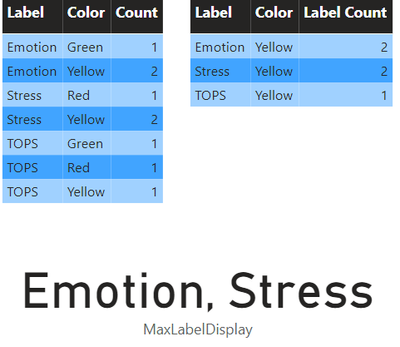
vhuijieymsft_0-1713331647835.png


pbix file is attached.


If you have any further questions please feel free to contact me.


Best Regards,
Yang
Community Support Team


If there is any post helps, then please consider Accept it as the solution  to help the other members find it more quickly.
If I misunderstand your needs or you still have problems on it, please feel free to let us know. Thanks a lot!

View solution in original post

1 REPLY 1
Anonymous
Not applicable

Hi @LizK75 ,


Using variables to store is not convenient for observation.


To achieve your needs, my approach is:


First, create a Table using New Table:

Yellowtable = FILTER('Resume','Resume'[Color] = "Yellow")


Create a calculated column to calculate the number of each Label. It is not convenient to use measure for row-by-row comparison.

Label Count = CALCULATE(COUNTROWS('Yellowtable'), ALLEXCEPT('Yellowtable', 'Yellowtable'[Label]))


Finally, create a measure to display the Label name with the largest number of Labels when Color = Yellow.

MaxLabelDisplay = 
VAR MaxCount = CALCULATE(MAX('Yellowtable'[Label Count]), ALLEXCEPT('Yellowtable', 'Yellowtable'[Label]))
RETURN
CALCULATE(
    CONCATENATEX(
        VALUES('Yellowtable'[Label]), 
        'Yellowtable'[Label], 
        ", "
    ), 
    'Yellowtable'[Label Count] = MaxCount,
    REMOVEFILTERS('Yellowtable')
)


In this case, when Color = Yellow, the maximum number of Labels is 2, and the Label name is "Emotion, Stress".


The final page effect is as follows:

vhuijieymsft_0-1713331647835.png


pbix file is attached.


If you have any further questions please feel free to contact me.


Best Regards,
Yang
Community Support Team


If there is any post helps, then please consider Accept it as the solution  to help the other members find it more quickly.
If I misunderstand your needs or you still have problems on it, please feel free to let us know. Thanks a lot!

Helpful resources

Announcements
New to Fabric survey Carousel

New to Fabric Survey

If you have recently started exploring Fabric, we'd love to hear how it's going. Your feedback can help with product improvements.

Power BI DataViz World Championships carousel

Power BI DataViz World Championships - June 2026

A new Power BI DataViz World Championship is coming this June! Don't miss out on submitting your entry.

Join our Fabric User Panel

Join our Fabric User Panel

Share feedback directly with Fabric product managers, participate in targeted research studies and influence the Fabric roadmap.

March Power BI Update Carousel

Power BI Community Update - March 2026

Check out the March 2026 Power BI update to learn about new features.