This is best Fabric, Power BI, SQL and AI community event. How do we know? The last event sold out! Save €200 with code FABCMTY200.
Register nowA new Data Days event is coming soon! This time we’re going bigger than ever. Fabric, Power BI, SQL, AI and more. Don't miss out.
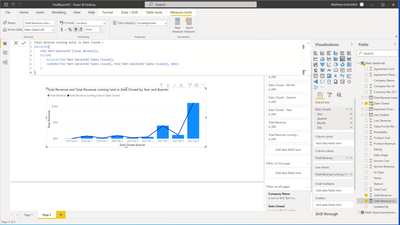
I am atemting to get a running total from the start of wnd of 2019 to the current date. Included is a picture of my dax code that is not currently working. Thanks!
Solved! Go to Solution.
I was able to fix it by making a my own date table and using this code:
Hi @Anonymous
You need to add a Date table [Calendar Table] to your report.
To work with Data Analysis Expressions (DAX) time intelligence functions, there's a prerequisite model requirement: You must have at least one date table in your model.
Check this link:
https://www.vahiddm.com/post/creating-calendar-table-with-3-steps
If this post helps, please consider accepting it as the solution to help the other members find it more quickly.
Appreciate your Kudos!!
LinkedIn: www.linkedin.com/in/vahid-dm/
Does it help at all if you replace the ISONORAFTER line with the following?
'Matt-DataForBI'[Date Closed] <= MAX ( 'Matt-DataForBI'[Date Closed] )
I tried that an unfortentetly it doesnt.
Hmm. What if you replace ALLSELECTED ( 'Matt-DataForBI'[Date Closed] ) with ALLSELECTED ( 'Matt-DataForBI' )?
I was able to fix it by making a my own date table and using this code:
Great! Having a date dimension table is almost always a good idea.
Check out the May 2026 Power BI update to learn about new features.
Sign up to receive a private message when registration opens and key events begin.
If you have recently started exploring Fabric, we'd love to hear how it's going. Your feedback can help with product improvements.
| User | Count |
|---|---|
| 7 | |
| 6 | |
| 5 | |
| 5 | |
| 4 |