cancel
Showing results for 
Search instead for 
Did you mean: 

Data Days is here! Join us now for 60+ days of learning, challenges, and connection. Learn more

Reply
Anonymous
Not applicable

Need help with running total

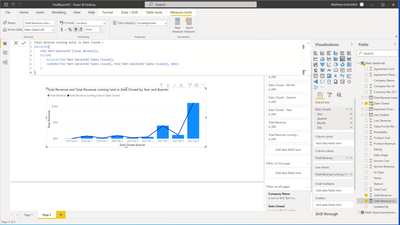
I am atemting to get a running total from the start of wnd of 2019 to the current date. Included is a picture of my dax code that is not currently working. Thanks!

mhgottsc_0-1640629732776.png


1 ACCEPTED SOLUTION
Anonymous
Not applicable

I was able to fix it by making a my own date table and using this code:

Total Revenue running total in Quarter =
CALCULATE(
    SUM('Matt-DataForBI'[Total Revenue]),
    FILTER(
        ALLSELECTED('Date'[Quarter]),
        ISONORAFTER('Date'[Quarter], MAX('Date'[Quarter]), DESC)
    )
)

View solution in original post

6 REPLIES 6
VahidDM
Super User
Super User

Hi @Anonymous 


You need to add a Date table [Calendar Table] to your report.
To work with Data Analysis Expressions (DAX) time intelligence functions, there's a prerequisite model requirement: You must have at least one date table in your model.


Check this link:

https://www.vahiddm.com/post/creating-calendar-table-with-3-steps


If this post helps, please consider accepting it as the solution to help the other members find it more quickly.
Appreciate your Kudos!!
LinkedIn: 
www.linkedin.com/in/vahid-dm/


AlexisOlson
Super User
Super User

Does it help at all if you replace the ISONORAFTER line with the following?

'Matt-DataForBI'[Date Closed] <= MAX ( 'Matt-DataForBI'[Date Closed] )


Anonymous
Not applicable

I tried that an unfortentetly it doesnt. 

Hmm. What if you replace ALLSELECTED ( 'Matt-DataForBI'[Date Closed] ) with ALLSELECTED ( 'Matt-DataForBI' )?

Anonymous
Not applicable

I was able to fix it by making a my own date table and using this code:

Total Revenue running total in Quarter =
CALCULATE(
    SUM('Matt-DataForBI'[Total Revenue]),
    FILTER(
        ALLSELECTED('Date'[Quarter]),
        ISONORAFTER('Date'[Quarter], MAX('Date'[Quarter]), DESC)
    )
)

Great! Having a date dimension table is almost always a good idea.

Helpful resources

Announcements
Fabric Data Days is here Carousel

Fabric Data Days 2026

Don't miss out on Data Days, June 15 through August 7. Learn Fabric, Power BI, SQL, AI and more.

May Power BI Update Carousel

Power BI Monthly Update - May 2026

Check out the May 2026 Power BI update to learn about new features.

Power BI DataViz World Championships carousel

Power BI DataViz World Championships - June 2026

A new Power BI DataViz World Championship is coming this June! Don't miss out on submitting your entry.