cancel
Showing results for 
Search instead for 
Did you mean: 

The Power BI Data Visualization World Championships is back! Get ahead of the game and start preparing now! Learn more

Reply
Anonymous
Not applicable

Need Help in number formating by using DAX commands

Hi ALL,
I need some help in number formatting in DAX , Below is the scenario & the DAX function which I have written.

I have revenue field in my source and as Power Bi represents Billion as "bn" and my client wants it to represent it as "B" , so they want if the numbers are less than 1000 then it represent at $ , if it is less than 1000000 then it should represent as $K , if it less than 1000000000 then it should be representing as $M and anything greater than that would be termed as $B. 

Here is what i have written :
"$"&
VAR number_ =
MAX ([Total Revenue] )
VAR decimal = "0.0"
RETURN
IF (
number_ >= 1000000000,
FORMAT ( number_ / 1000000000, decimal & "B" ),
IF ( number_ >= 1000000, FORMAT (number_ / 1000000, decimal & "M" ) )
).
when I create a new column and write a above dax function it is treating as Text and i am not able to summarize it , 
if I create a new measure then I input the above DAX function then it is not even allowing me to change the format from Text to Decimal.
Kindly Please help!!
Thanks & Regards
Shiv

1 ACCEPTED SOLUTION
v-yanjiang-msft
Community Support
Community Support

Hi @Anonymous ,

According to your description, by my test, a calculated column can't get the correct total anyway, but a measure can, because measure can first get the total number then format it.

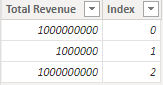
I create a sample.

vkalyjmsft_0-1654073486755.png

Here's my solution, create a measure, use SUM in the formula, not MAX.

Measure =
VAR number_ =
    SUM ( [Total Revenue] )
VAR decimal = "0.000"
RETURN
    IF (
        number_ >= 1000000000,
        FORMAT ( number_ / 1000000000, decimal & "B" ),
        IF ( number_ >= 1000000, FORMAT ( number_ / 1000000, decimal & "M" ) )
    )

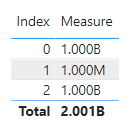
 Get the correct result. In order for measure to get multiple values, additional columns are required in the visual.

vkalyjmsft_1-1654073729958.png

I attach my sample below for reference.


Best Regards,
Community Support Team _ kalyj

If this post helps, then please consider Accept it as the solution to help the other members find it more quickly.


View solution in original post

5 REPLIES 5
v-yanjiang-msft
Community Support
Community Support

Hi @Anonymous ,

According to your description, by my test, a calculated column can't get the correct total anyway, but a measure can, because measure can first get the total number then format it.

I create a sample.

vkalyjmsft_0-1654073486755.png

Here's my solution, create a measure, use SUM in the formula, not MAX.

Measure =
VAR number_ =
    SUM ( [Total Revenue] )
VAR decimal = "0.000"
RETURN
    IF (
        number_ >= 1000000000,
        FORMAT ( number_ / 1000000000, decimal & "B" ),
        IF ( number_ >= 1000000, FORMAT ( number_ / 1000000, decimal & "M" ) )
    )

 Get the correct result. In order for measure to get multiple values, additional columns are required in the visual.

vkalyjmsft_1-1654073729958.png

I attach my sample below for reference.


Best Regards,
Community Support Team _ kalyj

If this post helps, then please consider Accept it as the solution to help the other members find it more quickly.


Whitewater100
Solution Sage
Solution Sage

Hi:

If you new to format text to number. In DAX usually INT or VALUES function can helpful. I think you can use a SWITCH statement. I did a little reseach on how to Format like you mentioned and found the following:


To Format to $1.56B

Measure = format(1558753918,"$#,,,.##B")  the number can be substituted for your measure. I have other examples below.  I hope this helps!

Whitewater100_0-1653786647031.png


"Currency (2)", FORMAT (             1234.567, """US$"" #,0.00" )

Currency (2)

US$ 1,234.57


Millions:

Sales to (M) = FORMAT([Sales Amount], "#,##,,.0M")     = 2,715.3M

Sales to (M) = FORMAT([Sales Amount], "#,##,,M")    =2,715M


Europe:

FORMAT(MuMeasure[EU], "#,##,,.0M") 


Thousands


Sales to (K) = FORMAT([Sales Amount], "#,##,K")   =205K


Sales to (K) = FORMAT([Sales Amount], "#,##,.0K") put it to one decimal   294.8k vs 294801

Whitewater100
Solution Sage
Solution Sage

Hi:

You can format :

To Format to $1.56B

Measure = format(1558753918,"$#,,,.##B")    * place measure instead of 1558753918.


amitchandak
Super User
Super User

@Anonymous , first create a measure and do that formatting there. It will text measure but will work

Share with Power BI Enthusiasts: Full Power BI Video (20 Hours) YouTube
Microsoft Fabric Series 60+ Videos YouTube
Microsoft Fabric Hindi End to End YouTube
Anonymous
Not applicable

Hi @amitchandak ,
I have followed the way you mentioned but when i create a bar chart with the measure , it is not giving me any data as it is text field.
Thanks & Regards
Shiv Kumar

Helpful resources

Announcements
Power BI DataViz World Championships

Power BI Dataviz World Championships

The Power BI Data Visualization World Championships is back! Get ahead of the game and start preparing now!

December 2025 Power BI Update Carousel

Power BI Monthly Update - December 2025

Check out the December 2025 Power BI Holiday Recap!

FabCon Atlanta 2026 carousel

FabCon Atlanta 2026

Join us at FabCon Atlanta, March 16-20, for the ultimate Fabric, Power BI, AI and SQL community-led event. Save $200 with code FABCOMM.