cancel
Showing results for 
Search instead for 
Did you mean: 

View all the Fabric Data Days sessions on demand. View schedule

Reply
Anonymous
Not applicable

Need Help! Writing a Measure to multiply between two Fact Tables

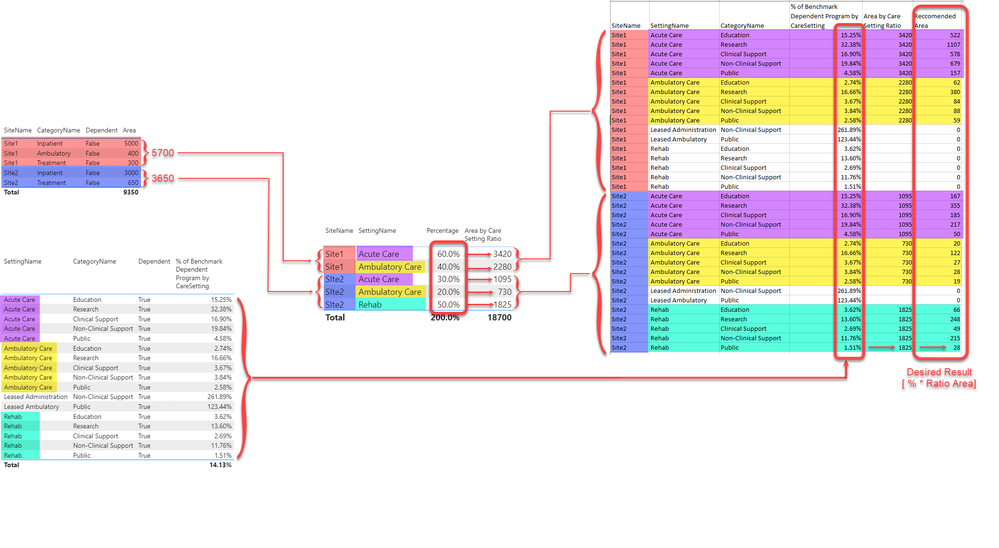
I need to multiply two measures by each other. The challenge is the two measures are calculated against two different Fact Tables. The information in the two Fact Tables is indirectly related by a common Dimension Table. One measure represents a percentage, the other measure represents a Value calculated by multipling by another Percentage.

For each unique Value it needs to be multiplied by the appropriate Perecentage based on Site & Care Setting (Dimensions) to determine which Percentage to use to multiply the Value.

I've thought a great deal about this, I think maybe virtual tables are required, to pull all the data together, but it is escaping me.

The data models breaks into three clean star schemas with shared Dimension Tables. All one to many relationships with single direction filtering.

Help! 🙂

See screenshots below.
Sample data here.

Data ModelData ModelCalculation Flow DiagramCalculation Flow Diagram

5 REPLIES 5
amitchandak
Super User
Super User

@Anonymous , These are the way you can work upon

What you need common dimension or dimesnion where you can multiply

In case you need one dimension 

sumx(summarize(Dim, Dim[Dim], "_1", [Measure from Table1], "_2", [Measure from Tabl2]),[_1]*[_2])


In case you need more tha one dimensions

sumx(summarize(Table1,Dim[Dim], Dim2[Dim2], "_1", [Measure from Table1], "_2", [Measure from Tabl2]),[_1]*[_2])

Share with Power BI Enthusiasts: Full Power BI Video (20 Hours) YouTube
Microsoft Fabric Series 60+ Videos YouTube
Microsoft Fabric Hindi End to End YouTube
Anonymous
Not applicable

@amitchandak I'm not sure I follow what you're suggesting. Are you saying to use Summarize to calculate each measure and multiply the two results? In another Forum someone suggested using CROSSFILTER, however while that results in the mathematical operation properly occuring, it negates the filtering in the [Area by Care Setting Ratio] which results in the wrong amount of area being calculated.

Anonymous
Not applicable

Anyone....?

Anonymous
Not applicable

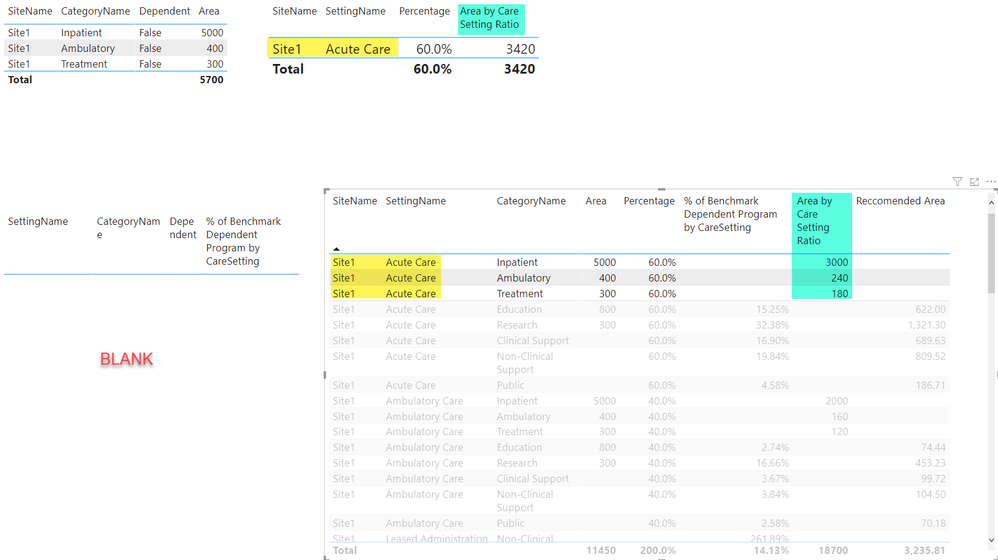
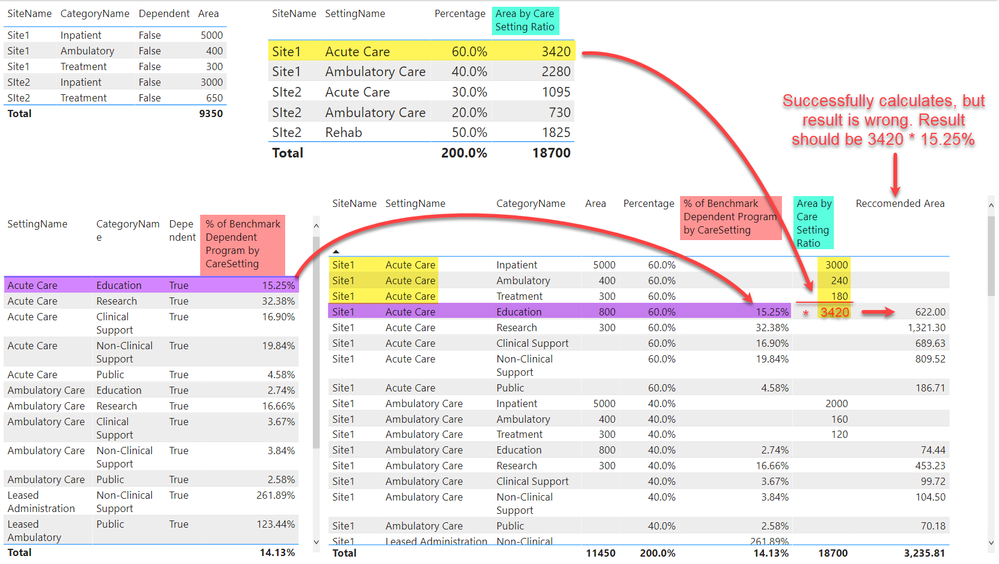
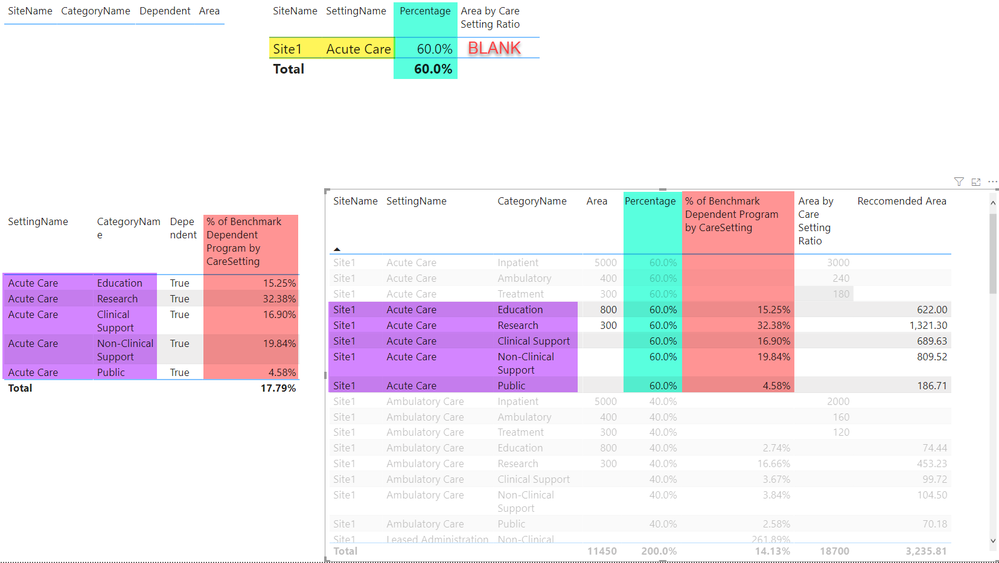
@amitchandak I studied your proposed suggested a bit more and also used Performance Analyzer to peak at the underlying queries for the Table visuals I have. The problem I see is that each Measure has to be uniquely summarized on a different table, then the results have to be multiplied by each other. Therefor there is no single table that you can summarize on. This is illustrated in particular if you highlight a row and apply cross filtering in a series of tables visuals. See the images below. The table in the bottom left represents the aggregation of the two different measures and you'll note that the last column "Reccomended Area" is calculating "something" but its wrong. If I cross highlight different rows, you'll observe the changes in the seperate tables to the left and top, illustrating that the two measures are summarizing on different values.

Area By CategoryArea By CategoryOverall FlowOverall Flow% of Benchmark Program% of Benchmark Program

Anonymous
Not applicable

If it helps at all, when the current calculation is performed, it is using the Sum of all area by Category to mutliply by the %. So rather than using only the Sum of Area for Site 1 Acute Care, it Sums the Acute Care area from Site 1 and Site 2, then multiplies by the appropriate % (for each site). Since everything is wrapped in calculate statements, filtering the visual does not change the outcome. Maybe I need to add "Site" to [Area by Care Setting Ratio]?

Area by Care Setting Ratio = 
VAR ProgramArea =
    CALCULATE(
        [RT Project Area by Cat],
        FILTER(
            ProjectArea,
            RELATED(Categories[Dependent]) = FALSE()
        ),
        FILTER(
            ProjectArea,
            RELATED(Categories[CareServices]) = TRUE()
        )
    )

RETURN
SUM(Ratios[Percentage]) * ProgramArea
 

Helpful resources

Announcements
November Power BI Update Carousel

Power BI Monthly Update - November 2025

Check out the November 2025 Power BI update to learn about new features.

Fabric Data Days Carousel

Fabric Data Days

Advance your Data & AI career with 50 days of live learning, contests, hands-on challenges, study groups & certifications and more!

FabCon Atlanta 2026 carousel

FabCon Atlanta 2026

Join us at FabCon Atlanta, March 16-20, for the ultimate Fabric, Power BI, AI and SQL community-led event. Save $200 with code FABCOMM.