Don't miss your chance to take the Fabric Data Engineer (DP-600) exam for FREE! Find out how by attending the DP-600 session on April 23rd (pacific time), live or on-demand.
Learn moreNext up in the FabCon + SQLCon recap series: The roadmap for Microsoft SQL and Maximizing Developer experiences in Fabric. All sessions are available on-demand after the live show. Register now
Hi everyone,
At the moment i have a problem with my moving average.
As you can see in the picture the moving average drops, because it count the month May. But the month May isn't over yet so it shouldn't be included in the moving average, because it gives a wrong image of the moving average. So i want to exclude the month we are in. I used the automatic formula that power bi provides;
Is there a way to exlude the current month in the moving average so it gives a right image of the moving average in three months?
Solved! Go to Solution.
@Anonymous , in the last calculate, move all into a filter
and try like
filter(all(Kalendar]) , Kalendar[date]<=emonth(today(),-1)
You've missed out the closing bracket for ALL function:
FILTER(ALL(Kalender)
Hi @amitchandak
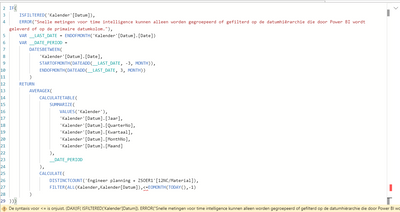
when i try to put in your exact part of the formula it gives a error ( is assume emonth =eomont because i cant find a dax with emont). First i copied your part:
But then it gives a error at <=
and when i removed <= out of the formula:
Any ideas how to solve this? thank you
You've missed out the closing bracket for ALL function:
FILTER(ALL(Kalender)
If you have recently started exploring Fabric, we'd love to hear how it's going. Your feedback can help with product improvements.
A new Power BI DataViz World Championship is coming this June! Don't miss out on submitting your entry.
Share feedback directly with Fabric product managers, participate in targeted research studies and influence the Fabric roadmap.
| User | Count |
|---|---|
| 9 | |
| 6 | |
| 3 | |
| 2 | |
| 2 |
| User | Count |
|---|---|
| 21 | |
| 12 | |
| 9 | |
| 5 | |
| 5 |