Join us at FabCon Atlanta from March 16 - 20, 2026, for the ultimate Fabric, Power BI, AI and SQL community-led event. Save $200 with code FABCOMM.
Register now!The Power BI Data Visualization World Championships is back! Get ahead of the game and start preparing now! Learn more
Hi everyone,
At the moment i have a problem with my moving average.
As you can see in the picture the moving average drops, because it count the month May. But the month May isn't over yet so it shouldn't be included in the moving average, because it gives a wrong image of the moving average. So i want to exclude the month we are in. I used the automatic formula that power bi provides;
Is there a way to exlude the current month in the moving average so it gives a right image of the moving average in three months?
Solved! Go to Solution.
@Anonymous , in the last calculate, move all into a filter
and try like
filter(all(Kalendar]) , Kalendar[date]<=emonth(today(),-1)
You've missed out the closing bracket for ALL function:
FILTER(ALL(Kalender)
Hi @amitchandak
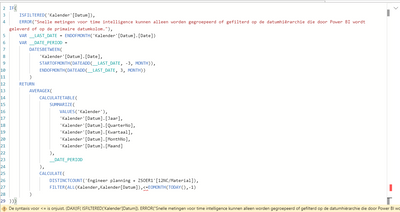
when i try to put in your exact part of the formula it gives a error ( is assume emonth =eomont because i cant find a dax with emont). First i copied your part:
But then it gives a error at <=
and when i removed <= out of the formula:
Any ideas how to solve this? thank you
You've missed out the closing bracket for ALL function:
FILTER(ALL(Kalender)
Check out the November 2025 Power BI update to learn about new features.
Advance your Data & AI career with 50 days of live learning, contests, hands-on challenges, study groups & certifications and more!
| User | Count |
|---|---|
| 21 | |
| 10 | |
| 9 | |
| 4 | |
| 4 |
| User | Count |
|---|---|
| 35 | |
| 31 | |
| 20 | |
| 13 | |
| 10 |