Don't miss your chance to take the Fabric Data Engineer (DP-700) exam on us!
Learn moreWe've captured the moments from FabCon & SQLCon that everyone is talking about, and we are bringing them to the community, live and on-demand. Starts on April 14th. Register now
Hi All,
I am trying to get the most recent date and its assoicated active cases value for each LGA Name in a single table NSW.
I have written the DAX and it gets the most recent date but it just assoicates that date with every row. I've tried to filter the table by the measure by there doesn't seem to be a way.
(Power Query)Table NSW sorted by most recent date 19-01-22 and cases <> 0 or null = active cases 2044
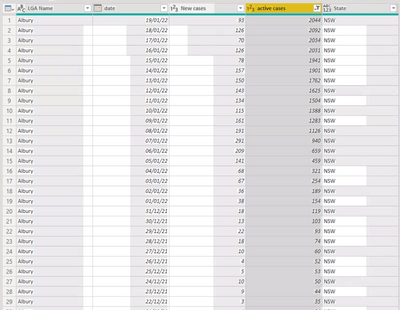
DAX:
Recent LGA Cases =
VAR CurrentLGA = SELECTEDVALUE(NSW[LGA Name])
RETURN
MAXX(
FILTER(ALL('NSW'),'NSW'[LGA Name] = CurrentLGA && NSW[active cases] <>0),
NSW[Date])
Result:
Retrives the correct date e.g 19-01-22 but not the active case as well. If try sum it just sums every row.
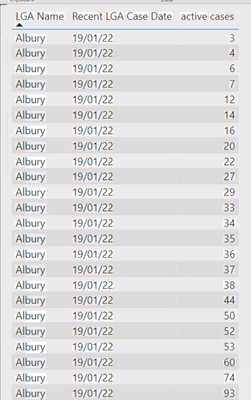
Thanks for any help.
Solved! Go to Solution.
Hi,
For calculations using most recent date you can use this logic:
var curdate = max('Calendar'[Date])
var lastestdate = CALCULATE(MAX('Table'[Date]),ALL('Calendar'),'Table'[Date]<=curdate) return
CALCULATE([Measure],'Table'[Date]=latestdate)
I hope this post helps to solve your issue and if it does consider accepting it as a solution and giving the post a thumbs up!
Proud to be a Super User!
Hi,
For calculations using most recent date you can use this logic:
var curdate = max('Calendar'[Date])
var lastestdate = CALCULATE(MAX('Table'[Date]),ALL('Calendar'),'Table'[Date]<=curdate) return
CALCULATE([Measure],'Table'[Date]=latestdate)
I hope this post helps to solve your issue and if it does consider accepting it as a solution and giving the post a thumbs up!
Proud to be a Super User!
Thanks for the reply, wasn't quite the answer but it put me on the right path. I ended up with;
DAX:
Recent LGA Cases =
VAR CurrentLGA = SELECTEDVALUE(NSW[LGA Name])
VAR MAXXDATE = MAXX(
FILTER(ALL('NSW'),'NSW'[LGA Name] = CurrentLGA && NSW[active cases] <>0),
NSW[Date])
RETURN
CALCULATE(SUM(NSW[Active Cases]), NSW[Date] = MAXXDate)
If you have recently started exploring Fabric, we'd love to hear how it's going. Your feedback can help with product improvements.
A new Power BI DataViz World Championship is coming this June! Don't miss out on submitting your entry.
Share feedback directly with Fabric product managers, participate in targeted research studies and influence the Fabric roadmap.
| User | Count |
|---|---|
| 9 | |
| 8 | |
| 3 | |
| 2 | |
| 2 |
| User | Count |
|---|---|
| 23 | |
| 14 | |
| 10 | |
| 6 | |
| 5 |