
Don't miss your chance to take the Fabric Data Engineer (DP-600) exam for FREE! Find out how by attending the DP-600 session on April 23rd (pacific time), live or on-demand.
Learn moreNext up in the FabCon + SQLCon recap series: The roadmap for Microsoft SQL and Maximizing Developer experiences in Fabric. All sessions are available on-demand after the live show. Register now
Hi there,
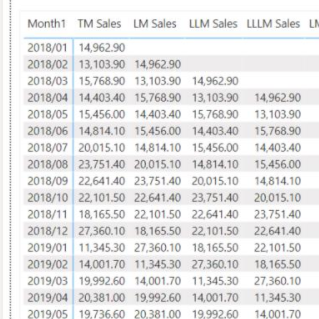
Below is the sum of Sales with
LLM last last month, LM Last Month, TM This Month
Hope my result like:
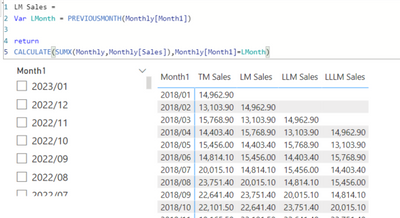
1st approach:
Right now i can retrieve the result by selecting Billing Month.
Without selecting Billing Month Error Message: A table of multiple values was supplied where a single value was expected
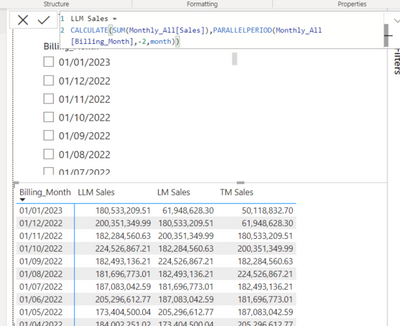
2nd approach:
Its not working since i have to use month as one of my parameter.
How can I modify the code so that I can have a full picture without selecting Month.
Thank you for your help.
Sammy Chu
Solved! Go to Solution.
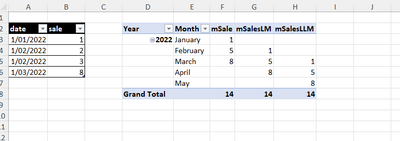
mSale:=SUM(Sales[sale])
mSalesLM:=CALCULATE([mSale],PARALLELPERIOD('Calendar'[Date],-1,MONTH))
mSalesLLM:=CALCULATE([mSale],PARALLELPERIOD('Calendar'[Date],-2,MONTH))
mSale:=SUM(Sales[sale])
mSalesLM:=CALCULATE([mSale],PARALLELPERIOD('Calendar'[Date],-1,MONTH))
mSalesLLM:=CALCULATE([mSale],PARALLELPERIOD('Calendar'[Date],-2,MONTH))
Hi @RichardOfSydney ,
Thank you for your help.
But the LLM get the same result with This month.
Cheers,
Sammy Chu
Dont use the var, they are 3 distinct measures.
If you have recently started exploring Fabric, we'd love to hear how it's going. Your feedback can help with product improvements.
A new Power BI DataViz World Championship is coming this June! Don't miss out on submitting your entry.
Experience the highlights from FabCon & SQLCon, available live and on-demand starting April 14th.
| User | Count |
|---|---|
| 6 | |
| 6 | |
| 3 | |
| 2 | |
| 2 |
| User | Count |
|---|---|
| 22 | |
| 10 | |
| 10 | |
| 7 | |
| 5 |