Hello Community , I am migrating a tableau dashboard to PowerBi dashboard. I am stuck with few of the measures of Tableau that I am finding tricky to write in DAX.
One of the measure is :
{ FIXED DATEPART('weekday', [Start Time]), DATEPART('hour', [Start Time]): AVG(
{ FIXED DATETRUNC('day', [Start Time]), DATEPART('weekday', [Start Time]), DATEPART('hour', [Start Time]):
COUNTD([Warehouse Name])}
)}
I came up with this DAX expression
Avg Warehouses on During this hour =
AVERAGEX (
SUMMARIZE ( WAREHOUSE_METERING_HISTORY, WAREHOUSE_METERING_HISTORY[START_TIME].[Day] ),
CALCULATE (AVERAGE( WAREHOUSE_METERING_HISTORY[Time] ) )
)
But this is not giving me the desired result . I am supposed to calculate a Total number of hours of warehouse at certain day at certain hour.
I am attaching the graph of tableau that I am working to recreate in PowerBI
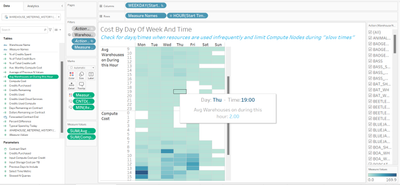
If anyone has done this or can help me understand & write this expression will be helpful.
Thank you


