cancel
Showing results for 
Search instead for 
Did you mean: 

The Power BI Data Visualization World Championships is back! Get ahead of the game and start preparing now! Learn more

Reply
Anonymous
Not applicable

Memory error when using rank formula

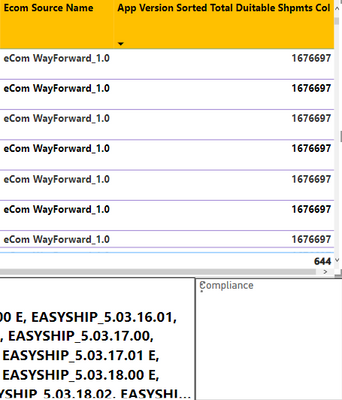
I have a measure "App version sorted Total Duitable Shpmts Col", and for each unique [ecom source name] which is a column, there is a number in the measure. 
KimberleyTayJY_1-1663931214864.png

I want to display the [ecom source name] with the highest number in the measure "App version sorted Total Duitable Shpmts Col".
I have created the following measure to obtain the [ecom source name] with the highest number in the measure "App version sorted Total Duitable Shpmts Col":


Most used App Version =             
MAXX(
TOPN(1, 'CIN Data Quality', [App Version Sorted Total Duitable Shpmts Col], DESC),
[Ecom Source Name]
)


The formula works fine for small numbers of rows when I filter the table visualisation.
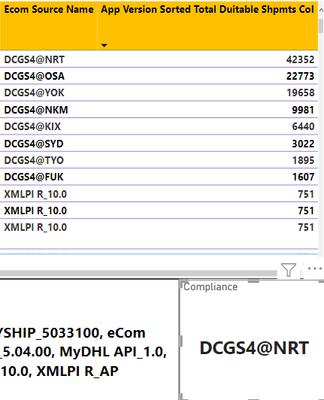
KimberleyTayJY_3-1663931978794.png


But when I don't filter, the table has over 200,000 rows, which leads to an error as shown below in the card:

KimberleyTayJY_4-1663932032465.png
When i click "see details", it shows the error below:


KimberleyTayJY_2-1663931896915.png


Is there a way I can obtain the [ecom source name] in the visualisation without ranking them?

1 ACCEPTED SOLUTION
Anonymous
Not applicable

1. Create a measure to find Maximum of measure.


Most used App Version Total Duitable Shpmts = MAXX(ALLSELECTED('CIN Data Quality'),[App Version Sorted Total Duitable Shpmts Col])


2. Create another measure to find [ecom source name] value when measure = maximum value above.


Most used App Version = 
CALCULATE(MAX([Ecom Source Name]), FILTER(allselected('CIN Data Quality'),[App Version Sorted Total Duitable Shpmts Col]=[Most used App Version Total Duitable Shpmts]))


View solution in original post

1 REPLY 1
Anonymous
Not applicable

1. Create a measure to find Maximum of measure.


Most used App Version Total Duitable Shpmts = MAXX(ALLSELECTED('CIN Data Quality'),[App Version Sorted Total Duitable Shpmts Col])


2. Create another measure to find [ecom source name] value when measure = maximum value above.


Most used App Version = 
CALCULATE(MAX([Ecom Source Name]), FILTER(allselected('CIN Data Quality'),[App Version Sorted Total Duitable Shpmts Col]=[Most used App Version Total Duitable Shpmts]))


Helpful resources

Announcements
Power BI DataViz World Championships

Power BI Dataviz World Championships

The Power BI Data Visualization World Championships is back! Get ahead of the game and start preparing now!

December 2025 Power BI Update Carousel

Power BI Monthly Update - December 2025

Check out the December 2025 Power BI Holiday Recap!

FabCon Atlanta 2026 carousel

FabCon Atlanta 2026

Join us at FabCon Atlanta, March 16-20, for the ultimate Fabric, Power BI, AI and SQL community-led event. Save $200 with code FABCOMM.