Join us at FabCon Atlanta from March 16 - 20, 2026, for the ultimate Fabric, Power BI, AI and SQL community-led event. Save $200 with code FABCOMM.
Register now!The Power BI Data Visualization World Championships is back! Get ahead of the game and start preparing now! Learn more
Hello,
I have the following data model:
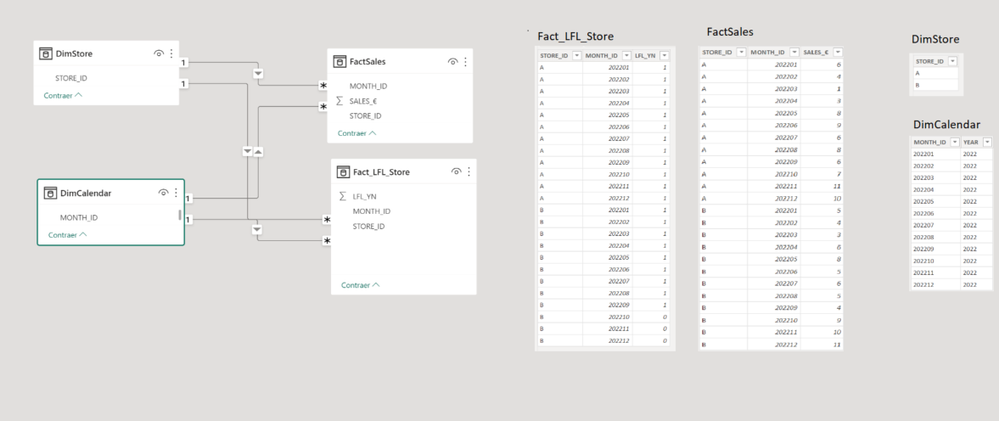
I need to create a measure that adds the sales from the FactSales table, but only when a store is "LFL", which is defined according to calculations to be carried out in the "FACT_LFL_STORE" table.
🚨 The logic to know if a store is LFL or not LFL is the following: For example, if in a slicer of my visualization I select 3 specific months, a store is considered LFL if for all those three selected months it has the value 1 in the "LFL_YN" column of the "FACT_LFL_STORE" table.
If a store has any of the months selected in the display slicer with "LFL_YN"=0 in the "FACT_LFL_STORE" table, then that store should not be counted in the sum of sales, even if there are some of the months selected in the slicer that have the field "LFL_YN"=1.
So, my problem is to get a measure that adds the sales when each store is considered as "LFL" according to my criteria in the period selected in the visualization slicer that uses the "MONTH_ID" field of the "DIMCALENDAR" table.
I have tried to build a virtual table that would summarize the "FACT_LFL_STORE" table, filtering those stores that according to the display slicer were "LFL", and then apply a filter to the sum of sales that would add only the sales of the stores that had in the previous virtual table, but I can't get it to work for me.
I would greatly appreciate if anyone knows how to fix this problem. 💛💛💛💛
Solved! Go to Solution.
Hi @JesusPenelas ,
Here are the steps you can follow:
1. Create measure.
Flag =
var _select=SELECTCOLUMNS('DimCalendar',"MonthID",[Month_ID])
var _table=
FILTER('Fact_LFL_Store','Fact_LFL_Store'[Month_ID] in _select && [LFL_YN]<>1)
var _column=SELECTCOLUMNS(_table,"Date",[STORE_ID])
return
IF(
NOT( MAX('FactSales'[STORE_ID])) in _column && MAX('FactSales'[Month_ID]) in _select,1,0)Sum_Measure =
SUMX(ALLSELECTED('FactSales'),[SALES])
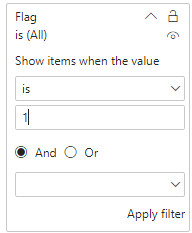
2. Place [Flag]in Filters, set is=1, apply filter.
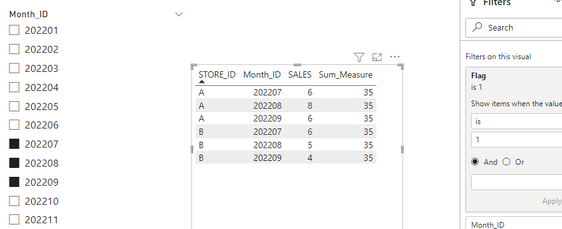
3. Result:
Select 202208 202209 202210:
Select 202207 202208 202209:
Best Regards,
Liu Yang
If this post helps, then please consider Accept it as the solution to help the other members find it more quickly
Thanks so much @Anonymous
It's near from the result I need, but I Need use the "Flag" measure as a filter inside the "Sum_Measure".
Thank you in advance for your help 💛💛💛💛
Hi @JesusPenelas ,
Here are the steps you can follow:
1. Create measure.
Flag =
var _select=SELECTCOLUMNS('DimCalendar',"MonthID",[Month_ID])
var _table=
FILTER('Fact_LFL_Store','Fact_LFL_Store'[Month_ID] in _select && [LFL_YN]<>1)
var _column=SELECTCOLUMNS(_table,"Date",[STORE_ID])
return
IF(
NOT( MAX('FactSales'[STORE_ID])) in _column && MAX('FactSales'[Month_ID]) in _select,1,0)Sum_Measure =
SUMX(ALLSELECTED('FactSales'),[SALES])
2. Place [Flag]in Filters, set is=1, apply filter.
3. Result:
Select 202208 202209 202210:
Select 202207 202208 202209:
Best Regards,
Liu Yang
If this post helps, then please consider Accept it as the solution to help the other members find it more quickly
Check out the November 2025 Power BI update to learn about new features.
Advance your Data & AI career with 50 days of live learning, contests, hands-on challenges, study groups & certifications and more!
| User | Count |
|---|---|
| 21 | |
| 10 | |
| 9 | |
| 4 | |
| 4 |
| User | Count |
|---|---|
| 35 | |
| 31 | |
| 20 | |
| 13 | |
| 10 |