
cancel
Showing results for 
Search instead for 
Did you mean: 

The Power BI Data Visualization World Championships is back! Get ahead of the game and start preparing now! Learn more

Reply
yogeshk77
Helper I
Helper I

Measure for Filtering on different criteria within the table

I have a Tasks table with this data

yogeshk77_0-1671531092332.png


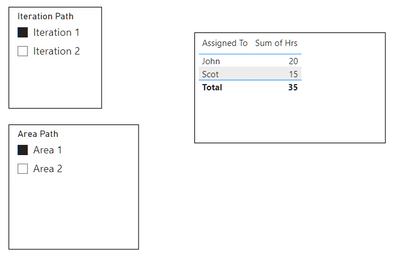
And I need to show data in such way with filters

yogeshk77_1-1671531165103.png

Notice that I don't want to show Release Areas in the filters on the report screen


Now, I need a measure that when we select Area, it should show Hrs of the person for the respective related Release Area (for e.g. Release\Area 1 in the above shown example)

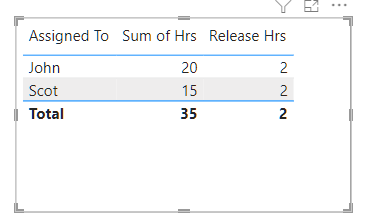
I have written a measure, but it's showing hrs for all records, instead of only one , like this below -

yogeshk77_2-1671531467674.png


Measure is like this - 

yogeshk77_3-1671531502416.png


Here is the Power BI File


1 ACCEPTED SOLUTION

I would use Power Query to split out the base area as a new column on the area master table and use that on the slicer. Then amend the measure to be

Release Hrs = 
VAR AreaFilter = TREATAS( SELECTCOLUMNS( VALUES( 'Area Master'[Area] ), "@release", "Core\Release\" & 'Area Master'[Area] ), 'Area Master'[Area Path] ) 
VAR IterationFilter = VALUES( 'Iteration Master'[Iteration Path] ) 
RETURN CALCULATE( SUM( 'Tasks'[Hrs] ), AreaFilter, IterationFilter ) 

See the attached file.

View solution in original post

4 REPLIES 4
johnt75
Super User
Super User

Try

Release Hrs =
VAR AreaFilter =
	TREATAS(
		SELECTCOLUMNS(
			VALUES( 'Area Master'[Area Path] ),
			"@release", "Release\" & 'Area Master'[Area Path]
		),
		'Area Master'[Area Path]
	)
VAR IterationFilter =
	VALUES( 'Iteration Master'[Iteration Path] )
RETURN
	CALCULATE(
		SUM( 'Tasks'[Hrs] ),
		AreaFilter,
		IterationFilter
	)

@johnt75 Sorry, I missed adding a Word "Core\" to the Area path.
When I have that, this measure is not working anymore.
Please take a look at this PBI file


I would use Power Query to split out the base area as a new column on the area master table and use that on the slicer. Then amend the measure to be

Release Hrs = 
VAR AreaFilter = TREATAS( SELECTCOLUMNS( VALUES( 'Area Master'[Area] ), "@release", "Core\Release\" & 'Area Master'[Area] ), 'Area Master'[Area Path] ) 
VAR IterationFilter = VALUES( 'Iteration Master'[Iteration Path] ) 
RETURN CALCULATE( SUM( 'Tasks'[Hrs] ), AreaFilter, IterationFilter ) 

See the attached file.

Got it.. Thanks a lot !

Helpful resources

Announcements
Power BI DataViz World Championships

Power BI Dataviz World Championships

The Power BI Data Visualization World Championships is back! Get ahead of the game and start preparing now!

November Power BI Update Carousel

Power BI Monthly Update - November 2025

Check out the November 2025 Power BI update to learn about new features.

FabCon Atlanta 2026 carousel

FabCon Atlanta 2026

Join us at FabCon Atlanta, March 16-20, for the ultimate Fabric, Power BI, AI and SQL community-led event. Save $200 with code FABCOMM.