cancel
Showing results for 
Search instead for 
Did you mean: 

The Power BI Data Visualization World Championships is back! Get ahead of the game and start preparing now! Learn more

Reply
Anonymous
Not applicable

Measure Total incorrect

Hi,


I am struggling with a measure total.  My row total is fine but the grand total at the bottom is wrong (just the one cell!) I can see why it is wrong but I'm not sure how to fix it.


If you look at the image you will see that I have planned and an actual colum.


planned is measure summing:-

 = CALCULATE (
SUM('Activity_view (2)'[Hours]),
FILTER (
'Activity_view (2)',
'Activity_view (2)'[SQL_ID] = 2
)
)


unplanned is a measure summing this:-

 = CALCULATE (
SUM('Activity_view (2)'[Adherance Hours]),
FILTER (
'Activity_view (2)',
'Activity_view (2)'[SQL_ID] = 1 && 'Activity_view (2)'[transtype] = 2
)
)

and additonal to planned this:-

 = IF ([Over Hours Actual Planned] - [Over Hours Planned] <0 , 0 , SUMX('Activity_view (2)',[Over Hours Actual Planned] - [Over Hours Planned]))


I have tried this and it actually returns nothing:-

= IF(HASONEFILTER('Activity_view (2)'[UserID]),
IF ([Over Hours Actual Planned] - [Over Hours Planned] <0 , 0 , SUMX('Activity_view (2)',[Over Hours Actual Planned] - [Over Hours Planned])))
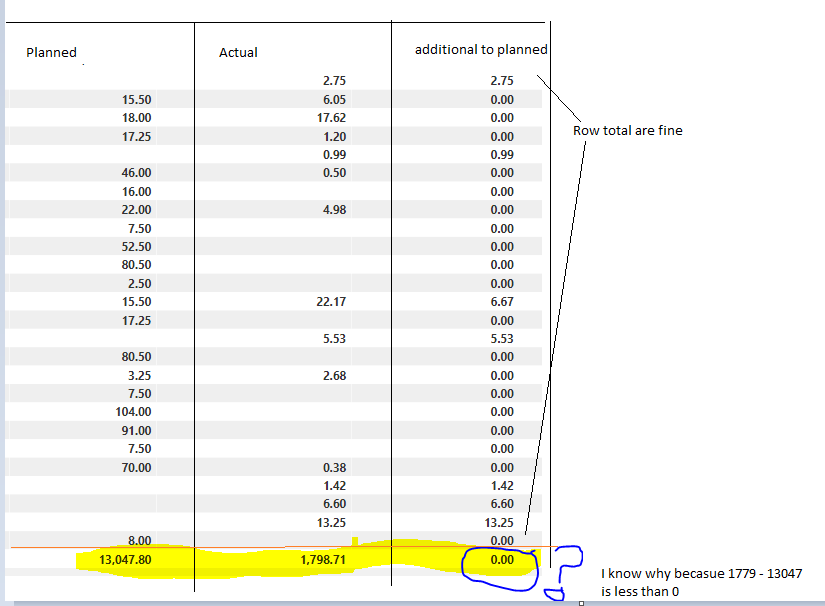
Capture.PNG


Any help would be appreciated.


1 ACCEPTED SOLUTION
Anonymous
Not applicable

ok, this has been causing me a problem all day but ive cracked it.


I created a second measure that uses the first:-


Over_Hours_Unplanned_Step_1 = IF(SUMX('Activity_view (2)',[Over Hours Actual Planned] - [Over Hours Planned]) < 0, 0, [Over Hours Actual Planned] - [Over Hours Planned])


Over_Hours_Unplanned_Step_2 = VAR __Unplanned = Summarize('Activity_view (2)','Activity_view (2)'[UserID],"__value",[Over Hours Unplanned_S1])
RETURN
IF(HASONEVALUE('Activity_view (2)'[UserID]),[Over Hours Unplanned_S1],SUMX(__Unplanned,[__value]))


and all is well!

View solution in original post

3 REPLIES 3
sturlaws
Resident Rockstar
Resident Rockstar

Hi, @Anonymous,


you don't get 0 in the column total of [additional to planned] because [actual] is greater than [planned], but because in your if-statement use hasonefilter([UserID]). In the total you don't have a filter on UserID, as you want to see the sum for all users which satisfy the conditions.


Try this instead

Actual - Planned =
VAR _tmp =
    SUMX (
        FILTER ( 'Table'; 'Table'[Actual] > [Planned] );
        'Table'[Actual] - 'Table'[Planned]
    )
RETURN
    IF ( ISBLANK ( _tmp ); 0; _tmp )

The code between VAR and RETURN is not neccessary, it is just there to make to code cleaner and easier to read, as you only need to write the SUMX-part once.

Anonymous
Not applicable

Hi,


I am struggling somewhat with this, i have tried your suggestion but my values are measures they aggregated  rows together first.


I tried your with the measures and with the full syntax as if the measure didn’t exist but i can’t get it working.


the measure for actual and planned is below...


Over Hours Actually Worked = CALCULATE (
    SUM('Activity_view (2)'[Adherence Hours]),
    FILTER (
        'Activity_view (2)',
        'Activity_view (2)'[SQL_ID] = 1 && 'Activity_view (2)'[transtype] = 2
    )
)


Over Hours Planned = CALCULATE (
    SUM('Activity_view (2)'[Hours]),
    FILTER (
        'Activity_view (2)',
        'Activity_view (2)'[SQL_ID] = 2
    )
)


I need a way of taking one from the other (if actual is greater than 0 then show a value else 0) and this works using the below measure it’s just all the totals are 0?  it’s got me stuck!


This is another way I have tried, and it again works for the row but not the total...


Over Hours Unplanned = IF ([Over Hours Actually worked] - [Over Hours Planned] <0 , 0 , [Over Hours Actually worked] - [Over Hours Planned])


Your help would be greatly appreciated.


Anonymous
Not applicable

ok, this has been causing me a problem all day but ive cracked it.


I created a second measure that uses the first:-


Over_Hours_Unplanned_Step_1 = IF(SUMX('Activity_view (2)',[Over Hours Actual Planned] - [Over Hours Planned]) < 0, 0, [Over Hours Actual Planned] - [Over Hours Planned])


Over_Hours_Unplanned_Step_2 = VAR __Unplanned = Summarize('Activity_view (2)','Activity_view (2)'[UserID],"__value",[Over Hours Unplanned_S1])
RETURN
IF(HASONEVALUE('Activity_view (2)'[UserID]),[Over Hours Unplanned_S1],SUMX(__Unplanned,[__value]))


and all is well!

Helpful resources

Announcements
Power BI DataViz World Championships

Power BI Dataviz World Championships

The Power BI Data Visualization World Championships is back! Get ahead of the game and start preparing now!

December 2025 Power BI Update Carousel

Power BI Monthly Update - December 2025

Check out the December 2025 Power BI Holiday Recap!

FabCon Atlanta 2026 carousel

FabCon Atlanta 2026

Join us at FabCon Atlanta, March 16-20, for the ultimate Fabric, Power BI, AI and SQL community-led event. Save $200 with code FABCOMM.