
The ultimate Fabric, Power BI, SQL, and AI community-led learning event. Save €200 with code FABCOMM.
Get registeredEnhance your career with this limited time 50% discount on Fabric and Power BI exams. Ends August 31st. Request your voucher.
Hi all,
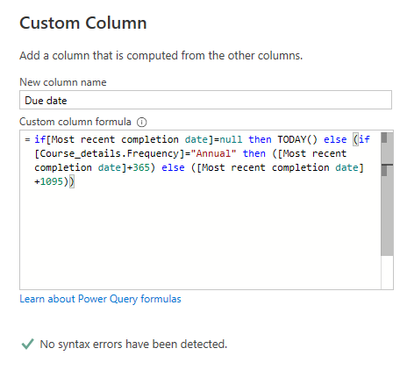
New to PowerBI but long time excel user - I am trying to create a custom column that returns todays date if the value in another column in null, and if not, returning a different date. The whole formula is working except for the todays date function (where I instead change this to a text return the whole thing works). I've tried representing it in multiple ways but to no success . Below is the current formula in PowerBI with the returning error.
Any help would be really appreciated!!
Many thanks,
Lucy
Solved! Go to Solution.
Thank you so much, I had tried to use datetime.localnow before but failed to realise I needed the () after! This works perfectly now.
#if you need a date use Date.From()
Date.From(DateTime.LocalNow())You should use this instad of TODAY()
| User | Count |
|---|---|
| 15 | |
| 8 | |
| 6 | |
| 6 | |
| 6 |
| User | Count |
|---|---|
| 23 | |
| 14 | |
| 13 | |
| 8 | |
| 8 |