cancel
Showing results for 
Search instead for 
Did you mean: 

The Power BI Data Visualization World Championships is back! Get ahead of the game and start preparing now! Learn more

Reply
Anonymous
Not applicable

Iterating over Measure calculations, counting current status of groups.

Hi, is there a better way of doing this?


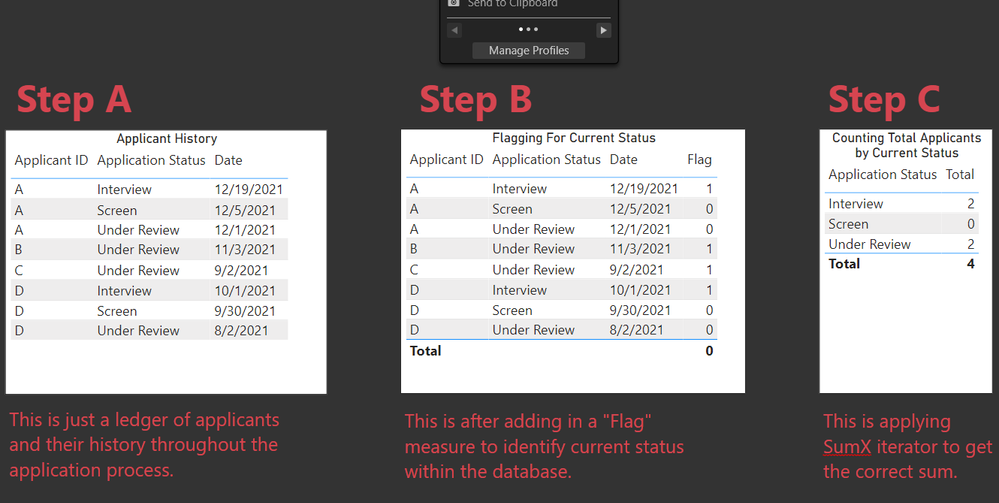
Lets say I have to identify the current application stage of candidates in our system. To do so, I'll first flag candidates with an IF-statement that evaluates 1 on their most current status (based on date and status name). However, the calculation is incomplete because the total does not sum correctly. Therefore, I add an additional step to iterate with SumX.


My question is, can I boil this into one tidy DAX calc rather than two? I've tried but haven't been successful. To be clear, I want an end table that lists ALL the status available, and sums the current status.


PBI file: Example File  


SumX Iterator Example.png

1 ACCEPTED SOLUTION
AlexisOlson
Super User
Super User

It's fairly trivial to combine the measures you have into one by expanding [Flag] inside [Total] but I'm guessing you're looking for something cleaner.


I propose the following:


StatusCount =
VAR Summary =
    SUMMARIZE ( ALL ( Data ), Data[Applicant ID], "MaxDate", MAX ( Data[Date] ) )
RETURN
    CALCULATE (
        COUNTROWS ( Data ),
        TREATAS ( Summary, Data[Applicant ID], Data[Date] )
    )


First, we compute a Summary table to get the maximal date for each distinct applicant. Note that I've used ALL since, otherwise, we'd only get the rows corresponding to the current Application Status filter.

Bearing this in mind, inside of COUNTROWS, Data is a subtable already filtered on Application Status but we wish to filter it further by only considering the most recent status.

To do this, I use TREATAS to treat the [Applicant ID] and [MaxDate] columns of Summarize as the only set pairs allowable for Data[Applicant ID] and Data[Date].


This simple-looking measure hides quite a bit of subtlety. I recommend reading this article to get a better handle on this sort of pattern:
https://www.sqlbi.com/articles/propagate-filters-using-treatas-in-dax/

View solution in original post

4 REPLIES 4
AlexisOlson
Super User
Super User

It's fairly trivial to combine the measures you have into one by expanding [Flag] inside [Total] but I'm guessing you're looking for something cleaner.


I propose the following:


StatusCount =
VAR Summary =
    SUMMARIZE ( ALL ( Data ), Data[Applicant ID], "MaxDate", MAX ( Data[Date] ) )
RETURN
    CALCULATE (
        COUNTROWS ( Data ),
        TREATAS ( Summary, Data[Applicant ID], Data[Date] )
    )


First, we compute a Summary table to get the maximal date for each distinct applicant. Note that I've used ALL since, otherwise, we'd only get the rows corresponding to the current Application Status filter.

Bearing this in mind, inside of COUNTROWS, Data is a subtable already filtered on Application Status but we wish to filter it further by only considering the most recent status.

To do this, I use TREATAS to treat the [Applicant ID] and [MaxDate] columns of Summarize as the only set pairs allowable for Data[Applicant ID] and Data[Date].


This simple-looking measure hides quite a bit of subtlety. I recommend reading this article to get a better handle on this sort of pattern:
https://www.sqlbi.com/articles/propagate-filters-using-treatas-in-dax/

Anonymous
Not applicable

Hey @AlexisOlson , thanks for the response.


Let me clarify, how would we output a measure that displays all the available application status and a count of the current status of each application? So when I apply application status row context, the status without any "active" applications does not drop out.

So your concern is that it returns a blank instead of zero for Screen?


You could just add " + 0" to the end of the measure I suggested. More discussion of 0 vs blank here:
https://www.sqlbi.com/articles/how-to-return-0-instead-of-blank-in-dax/

Anonymous
Not applicable

Wow, I never thought of just adding 0 to the end. 


Thanks!

Helpful resources

Announcements
Power BI DataViz World Championships

Power BI Dataviz World Championships

The Power BI Data Visualization World Championships is back! Get ahead of the game and start preparing now!

December 2025 Power BI Update Carousel

Power BI Monthly Update - December 2025

Check out the December 2025 Power BI Holiday Recap!

FabCon Atlanta 2026 carousel

FabCon Atlanta 2026

Join us at FabCon Atlanta, March 16-20, for the ultimate Fabric, Power BI, AI and SQL community-led event. Save $200 with code FABCOMM.