Join us at FabCon Atlanta from March 16 - 20, 2026, for the ultimate Fabric, Power BI, AI and SQL community-led event. Save $200 with code FABCOMM.
Register now!The Power BI Data Visualization World Championships is back! Get ahead of the game and start preparing now! Learn more
Hi there,
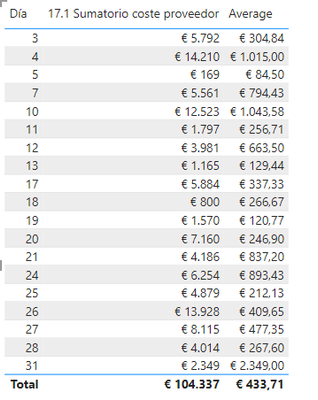
I'm having an issue and we are not able to create a measure to calculate the average of these month-to-month data. We are not sure what is happening when we use the average or averagex formula.
What I am trying to calculate is the sum of a column where we have different prices and then I want to calculate the month-to-month average of each data point, but I am not sure what it is calculating for me.
Measures: 17.1 Provider Cost Sum = SUM('17-Volume billing'[Provider Cost]) Average = AVERAGEX('17-Volume billing',[17.1 Provider Cost Sum])
Thanks.
Solved! Go to Solution.
@jesusssss
Please try
Average =
VAR MaxDate =
MAX ( Calendario[Date] )
VAR MinDate =
CALCULATE ( MIN ( Calendario[Date] ), ALLSELECTED ( Calendario ) )
VAR DatesOnAndBefore =
CALCULATETABLE (
VALUES ( Calendario[Mes] ),
Calendario[Date] <= MaxDate,
Calendario[Date] >= MinDate,
ALLSELECTED ()
)
RETURN
IF (
[17.1 Provider Cost Sum] <> BLANK (),
AVERAGEX ( DatesOnAndBefore, [17.1 Provider Cost Sum] )
)
I'll send you zoom meeting in a private message
Perfect, it worked correctly. Thank you very much for everything.
Please Provide more info.
Hi @tamerj1 and @aditya0125
In this Excel file, you can see the unit price data per month and then the average, which is what we would like to replicate in Power BI. The function in the Average cell is in Spanish but it is AVERAGE($B$6:D$6), and we replicated that function in the other cells.
In this image, you can see the column for which we want to calculate the average, which we achieved by creating a custom column that multiplies "quantity" by "net price."
As you can see, the average in the Excel table is not the same as the one I get when I use the AVERAGE function in Power BI, I hope this extra information has been helpful and that we can identify what the problem is. Thank you very much for your help.
Check out the November 2025 Power BI update to learn about new features.
Advance your Data & AI career with 50 days of live learning, contests, hands-on challenges, study groups & certifications and more!
| User | Count |
|---|---|
| 21 | |
| 10 | |
| 9 | |
| 4 | |
| 4 |
| User | Count |
|---|---|
| 34 | |
| 31 | |
| 20 | |
| 13 | |
| 12 |