Join us at FabCon Atlanta from March 16 - 20, 2026, for the ultimate Fabric, Power BI, AI and SQL community-led event. Save $200 with code FABCOMM.
Register now!The Power BI Data Visualization World Championships is back! Get ahead of the game and start preparing now! Learn more
Hi
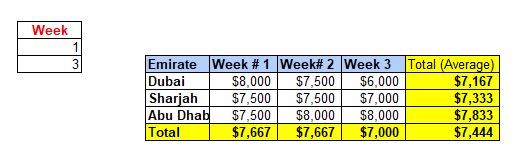
I have created a Matrix View in Power BI table as i wanted dynamic output based on the weeks selection. Here everything is working as i wanted except the Total - i need the average instead of total as highlighted in yellow colour. Can you please help.
Thanks
Soji
=averagex(summarize(Factable,table[Emirate],DateTable[Week]),[Amount])
Thanks for all responses.
I have managed to find the solution by creating a quick measure for the average.
Hi Amit,
I have manually added the average in the sample data which i shared but in BI i am getting total instead of average.
Thanks
@soji , Assume you have sum measure
the create measures
average measure 1= [sum measure]/distinctcount(Table[Week])
average measure 2= [sum measure]/distinctcount(Table[emirate])
and use below measure in matrix
Switch( True() ,
isfiltered(Table[Week]) && not( isfiltered(Table[Emirate])) ,[average measure 1],
not(isfiltered(Table[Week])) || isfiltered(Table[Emirate]) ,[average measure 2],
[sum measure]
)
@soji , Total seem like average, what is the problem?
isfiltered can help you in switching the total?
refer: https://powerpivotpro.com/2013/03/hasonevalue-vs-isfiltered-vs-hasonefilter/
The Power BI Data Visualization World Championships is back! Get ahead of the game and start preparing now!
| User | Count |
|---|---|
| 20 | |
| 11 | |
| 10 | |
| 4 | |
| 4 |
| User | Count |
|---|---|
| 32 | |
| 28 | |
| 19 | |
| 11 | |
| 10 |