Share feedback directly with Fabric product managers, participate in targeted research studies and influence the Fabric roadmap.
Sign up nowGet Fabric certified for FREE! Don't miss your chance! Learn more
Hi
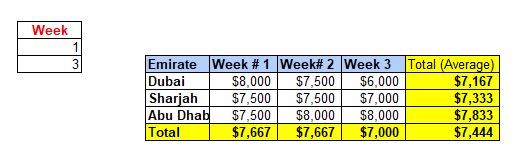
I have created a Matrix View in Power BI table as i wanted dynamic output based on the weeks selection. Here everything is working as i wanted except the Total - i need the average instead of total as highlighted in yellow colour. Can you please help.
Thanks
Soji
=averagex(summarize(Factable,table[Emirate],DateTable[Week]),[Amount])
Thanks for all responses.
I have managed to find the solution by creating a quick measure for the average.
Hi Amit,
I have manually added the average in the sample data which i shared but in BI i am getting total instead of average.
Thanks
@soji , Assume you have sum measure
the create measures
average measure 1= [sum measure]/distinctcount(Table[Week])
average measure 2= [sum measure]/distinctcount(Table[emirate])
and use below measure in matrix
Switch( True() ,
isfiltered(Table[Week]) && not( isfiltered(Table[Emirate])) ,[average measure 1],
not(isfiltered(Table[Week])) || isfiltered(Table[Emirate]) ,[average measure 2],
[sum measure]
)
@soji , Total seem like average, what is the problem?
isfiltered can help you in switching the total?
refer: https://powerpivotpro.com/2013/03/hasonevalue-vs-isfiltered-vs-hasonefilter/
If you love stickers, then you will definitely want to check out our Community Sticker Challenge!
Check out the January 2026 Power BI update to learn about new features.
| User | Count |
|---|---|
| 5 | |
| 4 | |
| 4 | |
| 3 | |
| 2 |
| User | Count |
|---|---|
| 15 | |
| 9 | |
| 9 | |
| 7 | |
| 5 |