


cancel
Showing results for 
Search instead for 
Did you mean: 

We've captured the moments from FabCon & SQLCon that everyone is talking about, and we are bringing them to the community, live and on-demand. Starts on April 14th. Register now

Reply
Anonymous
Not applicable

If statement using Custom Column

Hi Team


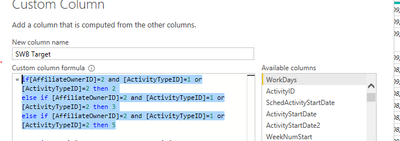
im trying to get the logic of how i would make this work so that it can dispay everything not just the first command under Custom column, Please help


if[AffiliateOwnerID]=2 and [ActivityTypeID]=1 or[ActivityTypeID]=2 then 2
else if [AffiliateOwnerID]=2 and [ActivityTypeID]=1 or[ActivityTypeID]=2 then 3
else if [AffiliateOwnerID]=2 and [ActivityTypeID]=1 or[ActivityTypeID]=2 then 5

ManwathaI_0-1618822824667.png

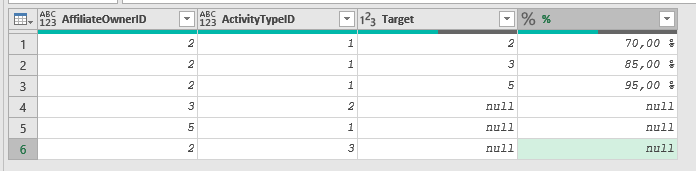
Reason why we need 3 targets under one activity is because we wat to asign each target to a certain percentage like on the screen shot below

ManwathaI_0-1618824033250.png


5 REPLIES 5
Payeras_BI
Solution Sage
Solution Sage

Hi again @Anonymous ,

Let's see if I understood it now.

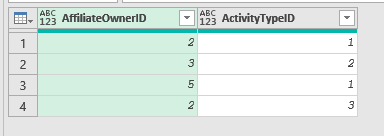
You start with something like this:

Payeras_BI_0-1618840040778.png

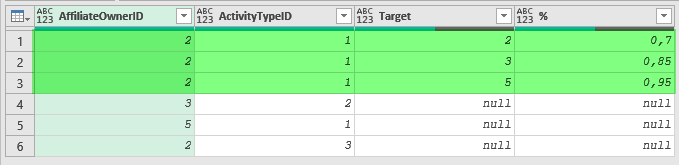
And want to end up with something like this:

Payeras_BI_1-1618840099862.png

If so, here is my proposal:

1. Create an Aux table like this one (named Target in my example): 

Payeras_BI_2-1618840184345.png

2. Add a Custom Column to your main table with the following code:

Table.SelectRows(Target, (X)=> List.Contains({1,2},[ActivityTypeID]) and [AffiliateOwnerID] = 2)

Payeras_BI_3-1618840304995.png

3. Expand it:

Payeras_BI_5-1618840809328.png


If this post answered your question, please mark it as a solution to help other users find useful content.
Kudos are another nice way to acknowledge those who tried to help you.

J. Payeras
Mallorca, Spain
Payeras_BI
Solution Sage
Solution Sage

Hi @Anonymous ,

Aren't all the if-conditions the same here?

Payeras_BI_0-1618824708783.png


If this post answered your question, please mark it as a solution to help other users find useful content.
Kudos are another nice way to acknowledge those who tried to help you.

J. Payeras
Mallorca, Spain
Anonymous
Not applicable

Hi @Payeras_BI

if you check, we need to have a target of 2,3 and 5 for the same activities ID under the same affiliate owner.

so the logic is that we want all those targets to show on that column so we can calculate the SLA % to indcate that

2=70%

3=85%

5=95%


i hope this will make it easy for you to understand the logic

Hi @Anonymous ,

Not sure if this is what you are looking for but try with this instead to get an idea of why the previous code was not working and take it from there.

= if[AffiliateOwnerID]=2 and ([ActivityTypeID]=1 or[ActivityTypeID]=2) then 2
else if [AffiliateOwnerID]=3 and ([ActivityTypeID]=1 or[ActivityTypeID]=2) then 3
else if [AffiliateOwnerID]=5 and ([ActivityTypeID]=1 or[ActivityTypeID]=2) then 5
else null

Payeras_BI_1-1618830454691.png


If this post answered your question, please mark it as a solution to help other users find useful content.
Kudos are another nice way to acknowledge those who tried to help you.

J. Payeras
Mallorca, Spain
Anonymous
Not applicable

Hi @Payeras_BI it is for the same affilate owner that have affiliate owner 2, it just have 3 different targets. Do you perhaps have an idea of how we can achieve that

Helpful resources

Announcements
New to Fabric survey Carousel

New to Fabric Survey

If you have recently started exploring Fabric, we'd love to hear how it's going. Your feedback can help with product improvements.

Power BI DataViz World Championships carousel

Power BI DataViz World Championships - June 2026

A new Power BI DataViz World Championship is coming this June! Don't miss out on submitting your entry.

Join our Fabric User Panel

Join our Fabric User Panel

Share feedback directly with Fabric product managers, participate in targeted research studies and influence the Fabric roadmap.

March Power BI Update Carousel

Power BI Community Update - March 2026

Check out the March 2026 Power BI update to learn about new features.