Fabric Data Days starts November 4th!
Advance your Data & AI career with 50 days of live learning, dataviz contests, hands-on challenges, study groups & certifications and more!
Get registered- Power BI forums
- Get Help with Power BI
- Desktop
- Service
- Report Server
- Power Query
- Mobile Apps
- Developer
- DAX Commands and Tips
- Custom Visuals Development Discussion
- Health and Life Sciences
- Power BI Spanish forums
- Translated Spanish Desktop
- Training and Consulting
- Instructor Led Training
- Dashboard in a Day for Women, by Women
- Galleries
- Data Stories Gallery
- Themes Gallery
- Contests Gallery
- Quick Measures Gallery
- Visual Calculations Gallery
- Notebook Gallery
- Translytical Task Flow Gallery
- TMDL Gallery
- R Script Showcase
- Webinars and Video Gallery
- Ideas
- Custom Visuals Ideas (read-only)
- Issues
- Issues
- Events
- Upcoming Events
Join us at FabCon Atlanta from March 16 - 20, 2026, for the ultimate Fabric, Power BI, AI and SQL community-led event. Save $200 with code FABCOMM. Register now.
- Power BI forums
- Forums
- Get Help with Power BI
- DAX Commands and Tips
- Re: IF function _ I need to find a 6 digit number ...
- Subscribe to RSS Feed
- Mark Topic as New
- Mark Topic as Read
- Float this Topic for Current User
- Bookmark
- Subscribe
- Printer Friendly Page


- Mark as New
- Bookmark
- Subscribe
- Mute
- Subscribe to RSS Feed
- Permalink
- Report Inappropriate Content
IF function _ I need to find a 6 digit number in a textcolumn
Dear Community,
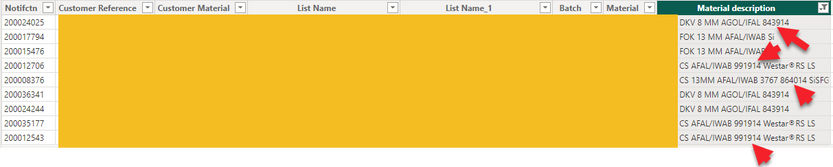
I hope you can help me. I need to create a calculated column to identyfy the lines with a 6 digit number in the text.
Is there a function to identify the notifictn(unic number) that has a 6 digit number in the material text(placed at different positions and with different 6 digit numbers)?


- Mark as New
- Bookmark
- Subscribe
- Mute
- Subscribe to RSS Feed
- Permalink
- Report Inappropriate Content
Hi @gjelstrup
Please test the following. I did not have the chance to test from my side.
6 digit number =
VAR String = 'Table'[Material Description]
VAR Items =
    SUBSTITUTE ( String, " ", "|" )
VAR Length1 =
    COALESCE ( PATHLENGTH ( Items ), 1 )
VAR T1 =
    GENERATESERIES ( 1, Length1, 1 )
VAR T2 =
    SELECTCOLUMNS ( T1, "@Item1", PATHITEM ( Items, [Value] ) )
VAR T3 =
    FILTER (
        T2,
        VAR Item1 =
            COALESCE ( [@Item1], 1 )
        VAR Length2 =
            LEN ( Item1 )
        VAR T4 =
            GENERATESERIES ( 1, Length2, 1 )
        VAR T5 =
            SELECTCOLUMNS ( T4, "@Item2", MID ( Item1, 1, [Value] ) )
        VAR T6 =
            GENERATESERIES ( 0, 10, 1 )
        RETURN
            LEN ( Item1 ) = 6
                && ISEMPTY ( EXCEPT ( T5, T6 ) )
    )
RETURN
MAXX ( T3, [@Item] )- Mark as New
- Bookmark
- Subscribe
- Mute
- Subscribe to RSS Feed
- Permalink
- Report Inappropriate Content
Hi @tamerj1 I really apprecialte your help. Thank you.
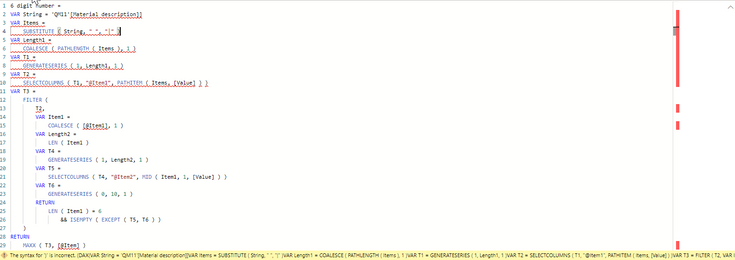
I cannot make it Work. I think that I need to change what is marked by ned in below scrren dump, however, I am not certain what I need to change it to.
- Mark as New
- Bookmark
- Subscribe
- Mute
- Subscribe to RSS Feed
- Permalink
- Report Inappropriate Content
- Mark as New
- Bookmark
- Subscribe
- Mute
- Subscribe to RSS Feed
- Permalink
- Report Inappropriate Content

- Mark as New
- Bookmark
- Subscribe
- Mute
- Subscribe to RSS Feed
- Permalink
- Report Inappropriate Content
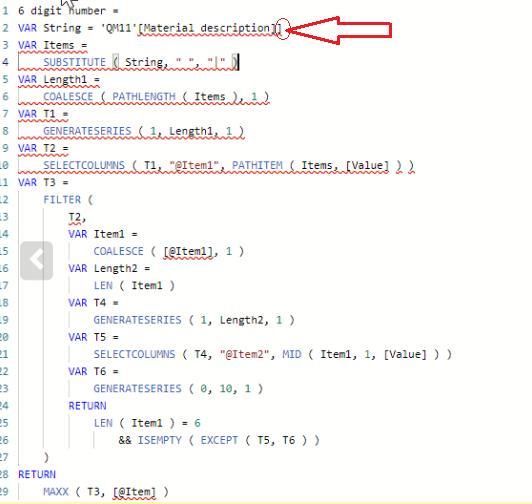
Yes, this is a typo mistake, the price paid for not testing. It should be [@Item2]
- Mark as New
- Bookmark
- Subscribe
- Mute
- Subscribe to RSS Feed
- Permalink
- Report Inappropriate Content

- Mark as New
- Bookmark
- Subscribe
- Mute
- Subscribe to RSS Feed
- Permalink
- Report Inappropriate Content
Apologies again. It should be [@Item1]
- Mark as New
- Bookmark
- Subscribe
- Mute
- Subscribe to RSS Feed
- Permalink
- Report Inappropriate Content
Sorry, im really new to this BI stuff, where are you putting this code, in a measure or a new column?
- Mark as New
- Bookmark
- Subscribe
- Mute
- Subscribe to RSS Feed
- Permalink
- Report Inappropriate Content

Helpful resources

FabCon Global Hackathon
Join the Fabric FabCon Global Hackathon—running virtually through Nov 3. Open to all skill levels. $10,000 in prizes!

Power BI Monthly Update - October 2025
Check out the October 2025 Power BI update to learn about new features.

FabCon Atlanta 2026
Join us at FabCon Atlanta, March 16-20, for the ultimate Fabric, Power BI, AI and SQL community-led event. Save $200 with code FABCOMM.

| User | Count |
|---|---|
| 8 | |
| 6 | |
| 3 | |
| 3 | |
| 3 |


| User | Count |
|---|---|
| 11 | |
| 9 | |
| 8 | |
| 6 | |
| 6 |


