Join us at FabCon Atlanta from March 16 - 20, 2026, for the ultimate Fabric, Power BI, AI and SQL community-led event. Save $200 with code FABCOMM.
Register now!Learn from the best! Meet the four finalists headed to the FINALS of the Power BI Dataviz World Championships! Register now
| Input Raw Data | ||
| Hire Date | Name | Location |
| 10/29/2019 | A | AAA |
| 10/30/2019 | B | BBB |
| 3/5/2012 | C | CCC |
| 5/10/2018 | E | AAA |
| 6/7/2018 | F | BBB |
| 8/25/2017 | G | CCC |
| 9/13/2016 | H | AAA |
| 1/19/2020 | I | BBB |
| 2/21/2020 | I | CCC |
| 3/19/2020 | I | AAA |
| 3/9/2020 | I | BBB |
| Desired Output1 | ||
| Number of Headcount per Month as on 2020 | Headcount by month | |
| Jan'20 | 8 | |
| Feb'20 | 9 | |
| Mar'20 | 11 |
@Anonymous ,
You can create a measure with the below DAX and use for this purpose
running headcount = CALCULATE(COUNT('Table (2)'[Name]), FILTER(ALL('Table (2)'), 'Table (2)'[Hire Date] <= MAX('Table (2)'[Hire Date])))
Regards,
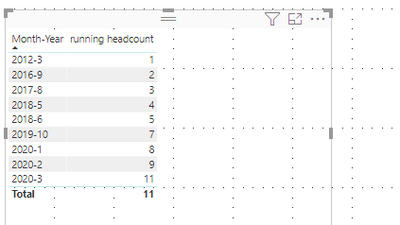
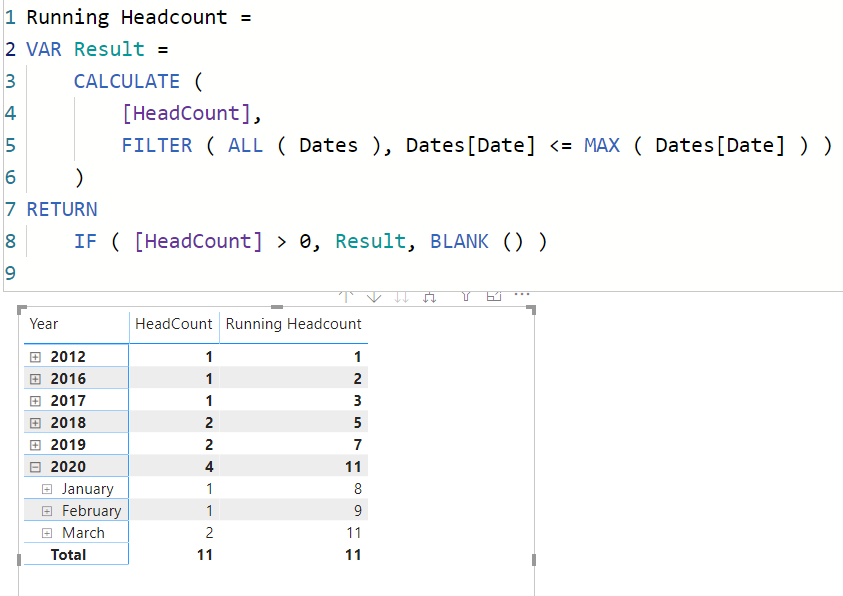
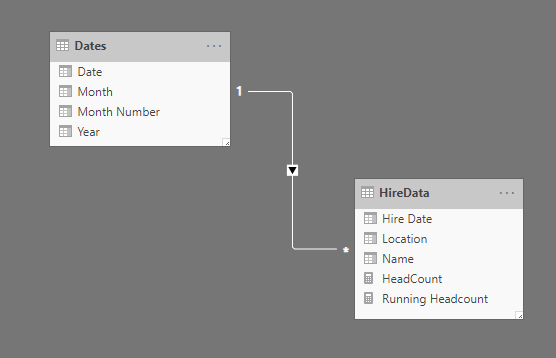
Something like this? You can use date table to slice the data.
HeadCount = COUNTROWS( HireData )Running Headcount =
VAR Result =
CALCULATE (
[HeadCount],
FILTER ( ALL ( Dates ), Dates[Date] <= MAX ( Dates[Date] ) )
)
RETURN
IF ( [HeadCount] > 0, Result, BLANK () )
HI @Anonymous ,
See if this helps.
Watch this video from 5:38 onwards.
https://www.youtube.com/watch?v=rsx43g7TBBs
Regards,
Harsh Nathani
Appreciate with a Kudos!! (Click the Thumbs Up Button)
Did I answer your question? Mark my post as a solution!
Share feedback directly with Fabric product managers, participate in targeted research studies and influence the Fabric roadmap.
Check out the February 2026 Power BI update to learn about new features.
| User | Count |
|---|---|
| 6 | |
| 3 | |
| 3 | |
| 3 | |
| 2 |
| User | Count |
|---|---|
| 8 | |
| 8 | |
| 8 | |
| 7 | |
| 7 |