Join us at FabCon Atlanta from March 16 - 20, 2026, for the ultimate Fabric, Power BI, AI and SQL community-led event. Save $200 with code FABCOMM.
Register now!The Power BI Data Visualization World Championships is back! Get ahead of the game and start preparing now! Learn more
I have a table, and a set of slicers that filter the table.
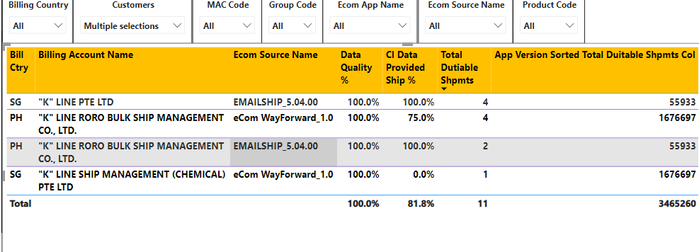
Currently, I am using the "customers" slicer to filter the "billing account name" column.
I want to display the "ecom source name" with the highest number of "total duitable shpmts" in another advanced card visualisation. To do that, I need to sum up the "total duitable shpmts" column for the same "ecom source name"s. (eg. emailship should show total of 4+2=6, and ecom should show total of 4+1=5)
I have seen solutions using ALLEXCEPT, and I have tried using the following measure (shown in the last column of visualisation)
App Version Sorted Total Duitable Shpmts Col =
var VarId= 'CIN Data Quality'[Ecom Source Name]
return
CALCULATE(SUM([Total Dutiable Shpmts]), FILTER('CIN Data Quality','CIN Data Quality'[Ecom Source Name]=VarId))
But I am getting results that are disregarding the values for "billing account name" a.k.a "customers" in the filter selection.
Solved! Go to Solution.
@Anonymous , Try Like
CALCULATE(SUM([Total Dutiable Shpmts]), FILTER(allselected('CIN Data Quality'),'CIN Data Quality'[Ecom Source Name]=Max('CIN Data Quality'[Ecom Source Name])))
@Anonymous , Try Like
CALCULATE(SUM([Total Dutiable Shpmts]), FILTER(allselected('CIN Data Quality'),'CIN Data Quality'[Ecom Source Name]=Max('CIN Data Quality'[Ecom Source Name])))
You're an expert! Thank you so much! 👍
The Power BI Data Visualization World Championships is back! Get ahead of the game and start preparing now!
Check out the November 2025 Power BI update to learn about new features.
| User | Count |
|---|---|
| 19 | |
| 11 | |
| 9 | |
| 4 | |
| 4 |
| User | Count |
|---|---|
| 35 | |
| 32 | |
| 20 | |
| 12 | |
| 10 |