Join us at FabCon Atlanta from March 16 - 20, 2026, for the ultimate Fabric, Power BI, AI and SQL community-led event. Save $200 with code FABCOMM.
Register now!The Power BI Data Visualization World Championships is back! Get ahead of the game and start preparing now! Learn more
I have a table containing sold shoes by customer. How do I visualize the sold shoes per sex as a percentage of the total order?
So the nominator = total order quantity per sex
and the denominator = total order quantity
| Orderno | Itemnr | OrderQuantity | Clientno | Sex |
| 100 | A | 4 | 10359 | Girl |
| 101 | B | 5 | 10160 | Girl |
| 101 | C | 6 | 10160 | Boy |
| 101 | D | 1 | 10160 | Boy |
| 102 | A | 2 | 10175 | Girl |
Solved! Go to Solution.
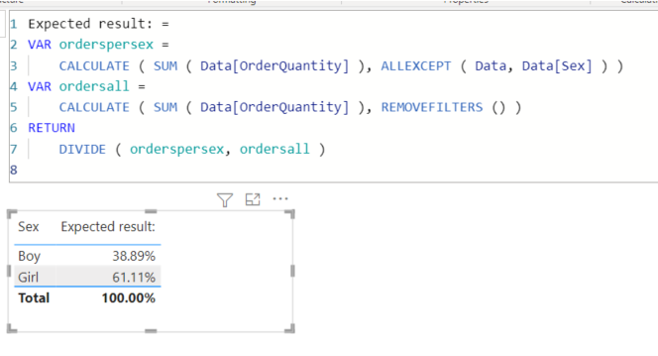
Expected result: =
VAR orderspersex =
CALCULATE ( SUM ( Data[OrderQuantity] ), ALLEXCEPT ( Data, Data[Sex] ) )
VAR ordersall =
CALCULATE ( SUM ( Data[OrderQuantity] ), REMOVEFILTERS () )
RETURN
DIVIDE ( orderspersex, ordersall )
Many thanks!
Expected result: =
VAR orderspersex =
CALCULATE ( SUM ( Data[OrderQuantity] ), ALLEXCEPT ( Data, Data[Sex] ) )
VAR ordersall =
CALCULATE ( SUM ( Data[OrderQuantity] ), REMOVEFILTERS () )
RETURN
DIVIDE ( orderspersex, ordersall )
@PaulusB , these measures can help
divide(sum(Table[OrderQuantity]), calculate(sum(Table[OrderQuantity]), allselected()))
divide(sumX(filter(Table, table[Sex] ="Girl"), Table[OrderQuantity]), calculate(sum(Table[OrderQuantity]), allselected()))
divide(sumX(filter(Table, table[Sex] ="Boy"), Table[OrderQuantity]), calculate(sum(Table[OrderQuantity]), allselected()))
Check out the November 2025 Power BI update to learn about new features.
Advance your Data & AI career with 50 days of live learning, contests, hands-on challenges, study groups & certifications and more!
| User | Count |
|---|---|
| 20 | |
| 11 | |
| 9 | |
| 4 | |
| 4 |
| User | Count |
|---|---|
| 31 | |
| 29 | |
| 21 | |
| 12 | |
| 12 |