cancel
Showing results for 
Search instead for 
Did you mean: 

Get Fabric Certified for FREE during Fabric Data Days. Don't miss your chance! Request now

Reply
PaulusB
Frequent Visitor

How to show percentage of total

I have a table containing sold shoes by customer. How do I visualize the sold shoes per sex as a percentage of the total order?

So the nominator = total order quantity per sex

and the denominator = total order quantity


OrdernoItemnrOrderQuantityClientnoSex
100A410359Girl
101B510160Girl
101C610160Boy
101D110160Boy
102A210175Girl
1 ACCEPTED SOLUTION
Jihwan_Kim
Super User
Super User

Picture1.png

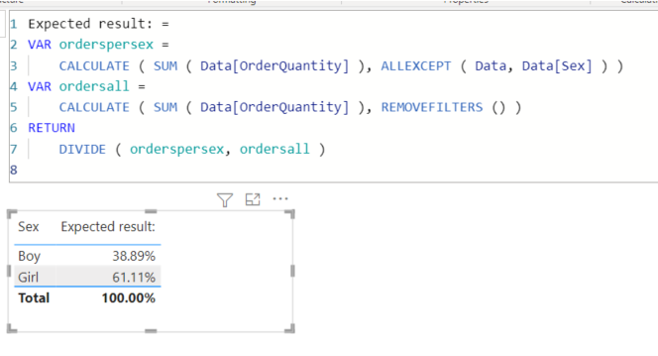
Expected result: =
VAR orderspersex =
CALCULATE ( SUM ( Data[OrderQuantity] ), ALLEXCEPT ( Data, Data[Sex] ) )
VAR ordersall =
CALCULATE ( SUM ( Data[OrderQuantity] ), REMOVEFILTERS () )
RETURN
DIVIDE ( orderspersex, ordersall )


If this post helps, then please consider accepting it as the solution to help other members find it faster, and give a big thumbs up.


Click here to visit my LinkedIn page

Click here to schedule a short Teams meeting to discuss your question.

View solution in original post

3 REPLIES 3
PaulusB
Frequent Visitor

Many thanks!

Jihwan_Kim
Super User
Super User

Picture1.png

Expected result: =
VAR orderspersex =
CALCULATE ( SUM ( Data[OrderQuantity] ), ALLEXCEPT ( Data, Data[Sex] ) )
VAR ordersall =
CALCULATE ( SUM ( Data[OrderQuantity] ), REMOVEFILTERS () )
RETURN
DIVIDE ( orderspersex, ordersall )


If this post helps, then please consider accepting it as the solution to help other members find it faster, and give a big thumbs up.


Click here to visit my LinkedIn page

Click here to schedule a short Teams meeting to discuss your question.
amitchandak
Super User
Super User

@PaulusB , these measures can help


divide(sum(Table[OrderQuantity]), calculate(sum(Table[OrderQuantity]), allselected()))


divide(sumX(filter(Table, table[Sex] ="Girl"), Table[OrderQuantity]), calculate(sum(Table[OrderQuantity]), allselected()))


divide(sumX(filter(Table, table[Sex] ="Boy"), Table[OrderQuantity]), calculate(sum(Table[OrderQuantity]), allselected()))

Share with Power BI Enthusiasts: Full Power BI Video (20 Hours) YouTube
Microsoft Fabric Series 60+ Videos YouTube
Microsoft Fabric Hindi End to End YouTube

Helpful resources

Announcements
November Power BI Update Carousel

Power BI Monthly Update - November 2025

Check out the November 2025 Power BI update to learn about new features.

Fabric Data Days Carousel

Fabric Data Days

Advance your Data & AI career with 50 days of live learning, contests, hands-on challenges, study groups & certifications and more!

FabCon Atlanta 2026 carousel

FabCon Atlanta 2026

Join us at FabCon Atlanta, March 16-20, for the ultimate Fabric, Power BI, AI and SQL community-led event. Save $200 with code FABCOMM.