Join us at FabCon Atlanta from March 16 - 20, 2026, for the ultimate Fabric, Power BI, AI and SQL community-led event. Save $200 with code FABCOMM.
Register now!The Power BI Data Visualization World Championships is back! Get ahead of the game and start preparing now! Learn more
Hello.
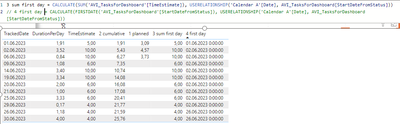
There is a problem - i need to show on visual only the first entry. The problem that it'll be the same so i can't use MIN or something similar.
"TrackedDate" and "4 first day" are both dates, but different ones. And "3 sum first day" use the same logic as "4 first day", just instead FIRSTDATE i SUMed another column (I'll use only "3 sum first day", and "4 first day" is created only to show how it works with days).
There is a screenshot of what i have now.
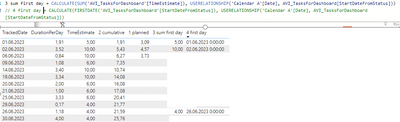
And how it should be.
It should display only the first entres for each new date in "4 first day"
I hope that it's possible to do in measure - i can create something similar as calculated columns but it won't be accurate i'm afraid.
Please provide sample data (with sensitive information removed) that covers your issue or question completely, in a usable format (not as a screenshot).
https://community.fabric.microsoft.com/t5/Community-Blog/How-to-provide-sample-data-in-the-Power-BI-...
Please show the expected outcome based on the sample data you provided.
https://community.fabric.microsoft.com/t5/Desktop/How-to-Get-Your-Question-Answered-Quickly/m-p/1447...
Check out the November 2025 Power BI update to learn about new features.
Advance your Data & AI career with 50 days of live learning, contests, hands-on challenges, study groups & certifications and more!
| User | Count |
|---|---|
| 20 | |
| 11 | |
| 9 | |
| 4 | |
| 4 |
| User | Count |
|---|---|
| 31 | |
| 29 | |
| 21 | |
| 12 | |
| 12 |