Join us at FabCon Vienna from September 15-18, 2025
The ultimate Fabric, Power BI, SQL, and AI community-led learning event. Save €200 with code FABCOMM.
Get registered- Power BI forums
- Get Help with Power BI
- Desktop
- Service
- Report Server
- Power Query
- Mobile Apps
- Developer
- DAX Commands and Tips
- Custom Visuals Development Discussion
- Health and Life Sciences
- Power BI Spanish forums
- Translated Spanish Desktop
- Training and Consulting
- Instructor Led Training
- Dashboard in a Day for Women, by Women
- Galleries
- Data Stories Gallery
- Themes Gallery
- Contests Gallery
- Quick Measures Gallery
- Notebook Gallery
- Translytical Task Flow Gallery
- TMDL Gallery
- R Script Showcase
- Webinars and Video Gallery
- Ideas
- Custom Visuals Ideas (read-only)
- Issues
- Issues
- Events
- Upcoming Events
Compete to become Power BI Data Viz World Champion! First round ends August 18th. Get started.
- Power BI forums
- Forums
- Get Help with Power BI
- DAX Commands and Tips
- Re: How to get the aging in each month
- Subscribe to RSS Feed
- Mark Topic as New
- Mark Topic as Read
- Float this Topic for Current User
- Bookmark
- Subscribe
- Printer Friendly Page

- Mark as New
- Bookmark
- Subscribe
- Mute
- Subscribe to RSS Feed
- Permalink
- Report Inappropriate Content
How to get the aging in each month
I want to get the aging of the items in each month from opened date to closed date.
So for the table below, what would be the age of the items below in April, then May, June and so forth. The aging will stop once the fill date has come. If no fill date, then today will be used.
| Opened Date | Closed Date | April | May | June | July | August |
| 5/1/2023 | 8/16/2023 | |||||
| 4/1/2023 |
Hope this makes sense. Thanks in advance!
Solved! Go to Solution.


- Mark as New
- Bookmark
- Subscribe
- Mute
- Subscribe to RSS Feed
- Permalink
- Report Inappropriate Content
I assume you have a Date table. Here is the measure:
age =
VAR monthStart = MIN ( 'Date'[Date] )
VAR monthEnd = MAX ( 'Date'[Date] )
VAR opened = SELECTEDVALUE ( 'Table'[Opened Date] )
VAR closed = COALESCE ( SELECTEDVALUE ( 'Table'[Closed Date] ), TODAY () )
VAR days = DATEDIFF ( opened, monthEnd, DAY ) + 1
RETURN
    IF ( TODAY () > monthEnd && monthStart >= opened && monthEnd <= closed, days )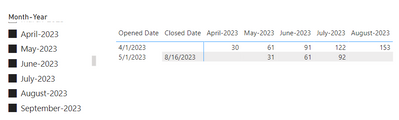
If this post helps, then please consider Accept it as the solution to help the other members find it more quickly. Appreciate your Kudos.
Check out my latest demo report in the data story gallery.
Stand with Ukraine!
Here are official ways you can support Ukraine financially (accounts with multiple currencies):
1) Support the Armed Forces of Ukraine: https://bank.gov.ua/ua/about/support-the-armed-forces
2) Come Back Alive foundation: https://www.comebackalive.in.ua/
Thank you!
- Mark as New
- Bookmark
- Subscribe
- Mute
- Subscribe to RSS Feed
- Permalink
- Report Inappropriate Content
Hi @Anonymous , should the age be in days or months? As far as I understand you have a matrix with months as columns.
If this post helps, then please consider Accept it as the solution to help the other members find it more quickly. Appreciate your Kudos.
Check out my latest demo report in the data story gallery.
Stand with Ukraine!
Here are official ways you can support Ukraine financially (accounts with multiple currencies):
1) Support the Armed Forces of Ukraine: https://bank.gov.ua/ua/about/support-the-armed-forces
2) Come Back Alive foundation: https://www.comebackalive.in.ua/
Thank you!
- Mark as New
- Bookmark
- Subscribe
- Mute
- Subscribe to RSS Feed
- Permalink
- Report Inappropriate Content
Hi! The age should be in days. For the months in columns, I want to know the age if that month is finished.
- Mark as New
- Bookmark
- Subscribe
- Mute
- Subscribe to RSS Feed
- Permalink
- Report Inappropriate Content
I assume you have a Date table. Here is the measure:
age =
VAR monthStart = MIN ( 'Date'[Date] )
VAR monthEnd = MAX ( 'Date'[Date] )
VAR opened = SELECTEDVALUE ( 'Table'[Opened Date] )
VAR closed = COALESCE ( SELECTEDVALUE ( 'Table'[Closed Date] ), TODAY () )
VAR days = DATEDIFF ( opened, monthEnd, DAY ) + 1
RETURN
    IF ( TODAY () > monthEnd && monthStart >= opened && monthEnd <= closed, days )
If this post helps, then please consider Accept it as the solution to help the other members find it more quickly. Appreciate your Kudos.
Check out my latest demo report in the data story gallery.
Stand with Ukraine!
Here are official ways you can support Ukraine financially (accounts with multiple currencies):
1) Support the Armed Forces of Ukraine: https://bank.gov.ua/ua/about/support-the-armed-forces
2) Come Back Alive foundation: https://www.comebackalive.in.ua/
Thank you!
- Mark as New
- Bookmark
- Subscribe
- Mute
- Subscribe to RSS Feed
- Permalink
- Report Inappropriate Content
Thank you so much for your help, Mate! One last question, what if I want to get the age up to the current day or up to the closed date? for example in the row 2, the closed date is 8/16, right? I want to get the age on the August column but up to the August 16 only.
- Mark as New
- Bookmark
- Subscribe
- Mute
- Subscribe to RSS Feed
- Permalink
- Report Inappropriate Content
age =
VAR monthStart =
    MIN ( 'Date'[Date] )
VAR monthEnd =
    MAX ( 'Date'[Date] )
VAR opened =
    SELECTEDVALUE ( 'Table'[Opened Date] )
VAR closed =
    COALESCE ( SELECTEDVALUE ( 'Table'[Closed Date] ), TODAY () )
VAR days =
    DATEDIFF ( opened, monthEnd, DAY ) + 1
VAR endDay =
    IF ( monthEnd <= closed, monthEnd, closed )
VAR days_last =
    DATEDIFF ( opened, endDay, DAY ) + 1
RETURN
    IF ( TODAY () > monthEnd && monthStart >= opened, days_last )
If this post helps, then please consider Accept it as the solution to help the other members find it more quickly. Appreciate your Kudos.
Check out my latest demo report in the data story gallery.
Stand with Ukraine!
Here are official ways you can support Ukraine financially (accounts with multiple currencies):
1) Support the Armed Forces of Ukraine: https://bank.gov.ua/ua/about/support-the-armed-forces
2) Come Back Alive foundation: https://www.comebackalive.in.ua/
Thank you!
- Mark as New
- Bookmark
- Subscribe
- Mute
- Subscribe to RSS Feed
- Permalink
- Report Inappropriate Content
Thanks for this. My problem with this is that if the monthEnd is greater than today and the monthStart < opened, the data is skewed and I tried creating a solution but to no avail. 😞
- Mark as New
- Bookmark
- Subscribe
- Mute
- Subscribe to RSS Feed
- Permalink
- Report Inappropriate Content
This is perfecly working! I have another question, would it be possible to count the number of items whose age is 90+? For example, in the month of June, there is 1 item whose age is 91 so that should count as 1 for the month of June only.
- Mark as New
- Bookmark
- Subscribe
- Mute
- Subscribe to RSS Feed
- Permalink
- Report Inappropriate Content
Hi. Yes.
age 90+ =
    VAR t =
        FILTER (
            ADDCOLUMNS (
                GENERATE (
                    VALUES ( 'Date'[Month-Year] ),
                    SUMMARIZE ( 'Table', 'Table'[Opened Date], 'Table'[Closed Date] )
                ),
                "@age", [age]
            ),
            [@age] >= 90
        )
    RETURN
        COUNTROWS ( t )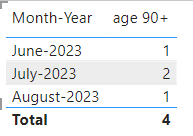
If this post helps, then please consider Accept it as the solution to help the other members find it more quickly. Appreciate your Kudos.
Check out my latest demo report in the data story gallery.
Stand with Ukraine!
Here are official ways you can support Ukraine financially (accounts with multiple currencies):
1) Support the Armed Forces of Ukraine: https://bank.gov.ua/ua/about/support-the-armed-forces
2) Come Back Alive foundation: https://www.comebackalive.in.ua/
Thank you!
Helpful resources

Power BI Monthly Update - August 2025
Check out the August 2025 Power BI update to learn about new features.

Fabric Community Update - August 2025
Find out what's new and trending in the Fabric community.

| User | Count |
|---|---|
| 16 | |
| 8 | |
| 7 | |
| 6 | |
| 6 |


| User | Count |
|---|---|
| 26 | |
| 13 | |
| 12 | |
| 8 | |
| 8 |


