Join us at FabCon Vienna from September 15-18, 2025
The ultimate Fabric, Power BI, SQL, and AI community-led learning event. Save €200 with code FABCOMM.
Get registered- Power BI forums
- Get Help with Power BI
- Desktop
- Service
- Report Server
- Power Query
- Mobile Apps
- Developer
- DAX Commands and Tips
- Custom Visuals Development Discussion
- Health and Life Sciences
- Power BI Spanish forums
- Translated Spanish Desktop
- Training and Consulting
- Instructor Led Training
- Dashboard in a Day for Women, by Women
- Galleries
- Data Stories Gallery
- Themes Gallery
- Contests Gallery
- Quick Measures Gallery
- Notebook Gallery
- Translytical Task Flow Gallery
- TMDL Gallery
- R Script Showcase
- Webinars and Video Gallery
- Ideas
- Custom Visuals Ideas (read-only)
- Issues
- Issues
- Events
- Upcoming Events
Enhance your career with this limited time 50% discount on Fabric and Power BI exams. Ends September 15. Request your voucher.
- Power BI forums
- Forums
- Get Help with Power BI
- DAX Commands and Tips
- Re: How to get previous week with an another measu...
- Subscribe to RSS Feed
- Mark Topic as New
- Mark Topic as Read
- Float this Topic for Current User
- Bookmark
- Subscribe
- Printer Friendly Page

- Mark as New
- Bookmark
- Subscribe
- Mute
- Subscribe to RSS Feed
- Permalink
- Report Inappropriate Content
How to get previous week with an another measure
Tying to get previouse week penetration, I'm getting error. Could you please assist.
Solved! Go to Solution.


- Mark as New
- Bookmark
- Subscribe
- Mute
- Subscribe to RSS Feed
- Permalink
- Report Inappropriate Content
Hi @Raneesh
Actually the formula I have messaged you was almost correct, the only mistake is switching between Numerator and Denominator. This one shall work
%Previous Week Penetration =
VAR PriorWeek =
    MAX ( 'Calendar'[Week of Year] ) - 1
VAR Customers =
    CALCULATE (
        DISTINCTCOUNT ( leadlist[Unit Number] ),
        'Calendar'[Week of Year] = PriorWeek
    )
VAR Occupancy =
    CALCULATE (
        SUM ( 'Occupancy tracker'[Total Occupied] ),
        'Calendar'[Week of Year] = PriorWeek
    )
RETURN
DIVIDE ( Customers, Occupancy )- Mark as New
- Bookmark
- Subscribe
- Mute
- Subscribe to RSS Feed
- Permalink
- Report Inappropriate Content
- Mark as New
- Bookmark
- Subscribe
- Mute
- Subscribe to RSS Feed
- Permalink
- Report Inappropriate Content
Yes.
- Mark as New
- Bookmark
- Subscribe
- Mute
- Subscribe to RSS Feed
- Permalink
- Report Inappropriate Content
Then this should work
#Prior Week Penetration =
VAR PriorWeek =
    MAX ( 'Calendar'[Week of Year] ) - 1
RETURN
    CALCULATE (
        DIVIDE ( [#Count of customer], [#Occupancy], 0 ),
        'Calendar'[Week of Year] = PriorWeek
)- Mark as New
- Bookmark
- Subscribe
- Mute
- Subscribe to RSS Feed
- Permalink
- Report Inappropriate Content
I'm expecting an output like below.
| Week Number | 1 | 2 | 3 | ||||
| Penetration | Current Week | Previous Week | Current Week | Previous Week | Current Week | Previous Week | |
| Building Name | |||||||
| Balqis | 4 | 0 | 5 | 4 | 9 | 5 | |
| South Residences | 7 | 0 | 8 | 7 | 11 | 8 |
- Mark as New
- Bookmark
- Subscribe
- Mute
- Subscribe to RSS Feed
- Permalink
- Report Inappropriate Content
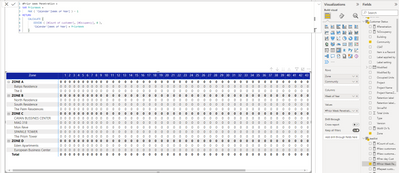
It still shows zero value.
- Mark as New
- Bookmark
- Subscribe
- Mute
- Subscribe to RSS Feed
- Permalink
- Report Inappropriate Content
Hi @Raneesh
You can try
#Prior Week Penetration =
VAR _Penetration =
    DIVIDE ( [#Count of customer], 'Occupancy tracker'[#Occupancy], 0 )
VAR _PenetrationChecked =
    IF ( ISBLANK ( _Penetration ), 0, _Penetration )
VAR PriorWeek =
    MAX ( 'Calendar'[Week of Year] ) - 1
RETURN
    CALCULATE (
        _PenetrationChecked,
        REMOVEFILTERS ( 'Calendar' ),
        'Calendar'[Week of Year] = PriorWeek
)- Mark as New
- Bookmark
- Subscribe
- Mute
- Subscribe to RSS Feed
- Permalink
- Report Inappropriate Content
- Mark as New
- Bookmark
- Subscribe
- Mute
- Subscribe to RSS Feed
- Permalink
- Report Inappropriate Content
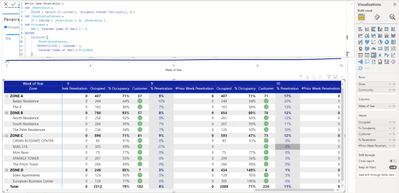
Hi @Raneesh
seems I forgot to use SUM
#Prior Week Penetration =
VAR Occupancy =
    SUM ( 'Occupancy tracker'[#Occupancy] )
VAR _Penetration =
    DIVIDE ( [#Count of customer], Occupancy, 0 )
VAR PriorWeek =
    MAX ( 'Calendar'[Week of Year] ) - 1
RETURN
    CALCULATE (
        _Penetration,
        REMOVEFILTERS ( 'Calendar' ),
        'Calendar'[Week of Year] = PriorWeek
)- Mark as New
- Bookmark
- Subscribe
- Mute
- Subscribe to RSS Feed
- Permalink
- Report Inappropriate Content
- Mark as New
- Bookmark
- Subscribe
- Mute
- Subscribe to RSS Feed
- Permalink
- Report Inappropriate Content
Hi @Raneesh
Actually the formula I have messaged you was almost correct, the only mistake is switching between Numerator and Denominator. This one shall work
%Previous Week Penetration =
VAR PriorWeek =
    MAX ( 'Calendar'[Week of Year] ) - 1
VAR Customers =
    CALCULATE (
        DISTINCTCOUNT ( leadlist[Unit Number] ),
        'Calendar'[Week of Year] = PriorWeek
    )
VAR Occupancy =
    CALCULATE (
        SUM ( 'Occupancy tracker'[Total Occupied] ),
        'Calendar'[Week of Year] = PriorWeek
    )
RETURN
DIVIDE ( Customers, Occupancy )- Mark as New
- Bookmark
- Subscribe
- Mute
- Subscribe to RSS Feed
- Permalink
- Report Inappropriate Content
- Mark as New
- Bookmark
- Subscribe
- Mute
- Subscribe to RSS Feed
- Permalink
- Report Inappropriate Content
Even now I'm geetting zero.
Thanks for your effort.

Helpful resources

Power BI Monthly Update - August 2025
Check out the August 2025 Power BI update to learn about new features.

Fabric Community Update - August 2025
Find out what's new and trending in the Fabric community.

| User | Count |
|---|---|
| 15 | |
| 12 | |
| 8 | |
| 7 | |
| 7 |


| User | Count |
|---|---|
| 24 | |
| 20 | |
| 12 | |
| 10 | |
| 7 |


