cancel
Showing results for 
Search instead for 
Did you mean: 

A new Data Days event is coming soon! This time we’re going bigger than ever. Fabric, Power BI, SQL, AI and more. Don't miss out.

Reply
ChPetru
Helper I
Helper I

Find the Power Law (or log) relationship between two variables

Hello,


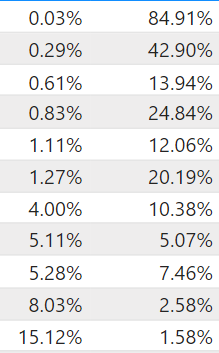
I am trying to find a constant (equation) that describes the non-linear proportionality between two variables (below).

I need this constant because I am multiplying the second (Y) variable with a number, and want to see the corresponding X values.


Example: Y is 84,91% and X is 0.03. What would X be if Y would be 86%?

I can calculate this in excel by making a power law graphical trendline and use the trendline the equation as multiplier with Y values to get aproximate X.


Second question, how can I make a power law or log trendline in Powerbi? I can only see the linear trendline..


         X                            Y

ChPetru_0-1647248627604.png


1 ACCEPTED SOLUTION
PiEye
Resolver II
Resolver II

Hi, there isn't a default equation in DAX or setting in the line chart that will help you do that. There is, however a lot of guidance online that can tell you how to calculate a straight line gradient / regression. See this great example here: https://xxlbi.com/blog/simple-linear-regression-in-dax/.

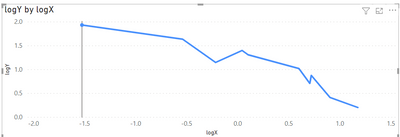
This can be applied to the logs.


The logs of your X / Y values have a linear relationship which looks like this:
PiEye_0-1647257471660.png


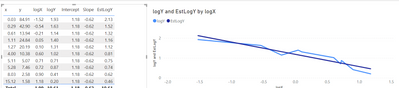
Using the guidance in the blog, I can apply the linear logic to those logs and calculate a straight line relationship:
PiEye_1-1647257541488.png


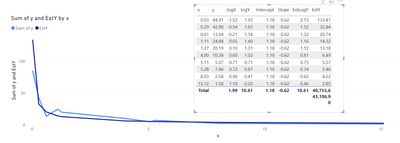
Applying I can then reverse this estimated log of Y back into a predicted value for Y and fit a curve on the XY chart:
PiEye_2-1647257615792.png


My expressions are as follows:

EstY = 10^('Table'[EstLogY])

EstLogY = 
VAR Known =
    FILTER (
        SELECTCOLUMNS (
            ALLSELECTED ( 'Table' ),
            "Known[X]", 'Table'[logX],
            "Known[Y]", 'Table'[logY]
        ),
        AND (
            NOT ( ISBLANK ( Known[X] ) ),
            NOT ( ISBLANK ( Known[Y] ) )
        )
    )
VAR Count_Items =
    COUNTROWS ( Known )
VAR Sum_X =
    SUMX ( Known, Known[X] )
VAR Sum_X2 =
    SUMX ( Known, Known[X] ^ 2 )
VAR Sum_Y =
    SUMX ( Known, Known[Y] )
VAR Sum_XY =
    SUMX ( Known, Known[X] * Known[Y] )
VAR Average_X =
    AVERAGEX ( Known, Known[X] )
VAR Average_Y =
    AVERAGEX ( Known, Known[Y] )
VAR Slope =
    DIVIDE (
        Count_Items * Sum_XY - Sum_X * Sum_Y,
        Count_Items * Sum_X2 - Sum_X ^ 2
    )
VAR Intercept =
    Average_Y - Slope * Average_X
RETURN 
   SUMX (
        DISTINCT ( 'Table'[Index]),
        Intercept + Slope * 'Table'[lnX]    )


Hope this helps!


Pi Eye 🙂

View solution in original post

4 REPLIES 4
PiEye
Resolver II
Resolver II

Hi, there isn't a default equation in DAX or setting in the line chart that will help you do that. There is, however a lot of guidance online that can tell you how to calculate a straight line gradient / regression. See this great example here: https://xxlbi.com/blog/simple-linear-regression-in-dax/.

This can be applied to the logs.


The logs of your X / Y values have a linear relationship which looks like this:

PiEye_0-1647257471660.png


Using the guidance in the blog, I can apply the linear logic to those logs and calculate a straight line relationship:

PiEye_1-1647257541488.png


Applying I can then reverse this estimated log of Y back into a predicted value for Y and fit a curve on the XY chart:

PiEye_2-1647257615792.png


My expressions are as follows:

EstY = 10^('Table'[EstLogY])

EstLogY = 
VAR Known =
    FILTER (
        SELECTCOLUMNS (
            ALLSELECTED ( 'Table' ),
            "Known[X]", 'Table'[logX],
            "Known[Y]", 'Table'[logY]
        ),
        AND (
            NOT ( ISBLANK ( Known[X] ) ),
            NOT ( ISBLANK ( Known[Y] ) )
        )
    )
VAR Count_Items =
    COUNTROWS ( Known )
VAR Sum_X =
    SUMX ( Known, Known[X] )
VAR Sum_X2 =
    SUMX ( Known, Known[X] ^ 2 )
VAR Sum_Y =
    SUMX ( Known, Known[Y] )
VAR Sum_XY =
    SUMX ( Known, Known[X] * Known[Y] )
VAR Average_X =
    AVERAGEX ( Known, Known[X] )
VAR Average_Y =
    AVERAGEX ( Known, Known[Y] )
VAR Slope =
    DIVIDE (
        Count_Items * Sum_XY - Sum_X * Sum_Y,
        Count_Items * Sum_X2 - Sum_X ^ 2
    )
VAR Intercept =
    Average_Y - Slope * Average_X
RETURN 
   SUMX (
        DISTINCT ( 'Table'[Index]),
        Intercept + Slope * 'Table'[lnX]    )


Hope this helps!


Pi Eye 🙂

Thank you!!

Welcome!

Greg_Deckler
Community Champion
Community Champion

@ChPetru Well, I believe the formula for Power Law is:

n = (logT2 - logT1) / (logM2 - logM1) is that what you are looking for? Here is a good paper on the math involved. 

LR05/PowerLaw (pomona.edu)


You also might consider Runge-Kutta for finding unknown values: 

https://community.powerbi.com/t5/Quick-Measures-Gallery/Runge-Kutta/m-p/411280#M149


Follow on LinkedIn
@ me in replies or I'll lose your thread!!!
Instead of a Kudo, please vote for this idea
Become an expert!: Enterprise DNA
External Tools: MSHGQM
YouTube Channel!: Microsoft Hates Greg
Latest book!:
DAX For Humans

DAX is easy, CALCULATE makes DAX hard...

Helpful resources

Announcements
May Power BI Update Carousel

Power BI Monthly Update - May 2026

Check out the May 2026 Power BI update to learn about new features.

Fabric SQL PBI Data Days

Data Days 2026 coming soon!

Sign up to receive a private message when registration opens and key events begin.

New to Fabric survey Carousel

New to Fabric Survey

If you have recently started exploring Fabric, we'd love to hear how it's going. Your feedback can help with product improvements.

Power BI DataViz World Championships carousel

Power BI DataViz World Championships - June 2026

A new Power BI DataViz World Championship is coming this June! Don't miss out on submitting your entry.