Join us at FabCon Atlanta from March 16 - 20, 2026, for the ultimate Fabric, Power BI, AI and SQL community-led event. Save $200 with code FABCOMM.
Register now!The Power BI Data Visualization World Championships is back! Get ahead of the game and start preparing now! Learn more
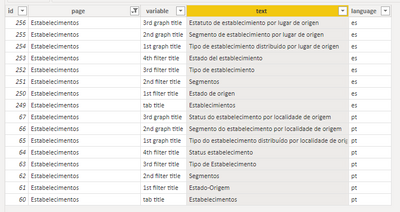
I have this table with graphics titles, cards and filters for each language (Spanish and Portuguese).
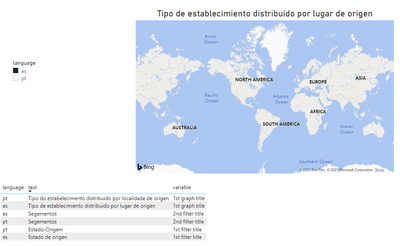
I'm new to DAX how can I create a measure that dynamically changes the title of this chart as I filter the page by "ES" or "PT" (Spanish or Portuguese, respectively?
Solved! Go to Solution.
Hey @matalb,
You can create a Calculated Column using the SWITCH function:
Dynamic Title =
SWITCH (
'Graphics Table'[variable],
"1st graph title", 'Graphics Table'[text]
)
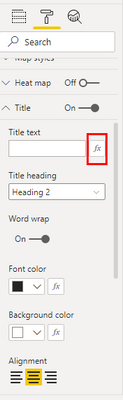
Then click on your visual, go to Title text, and click the function key.
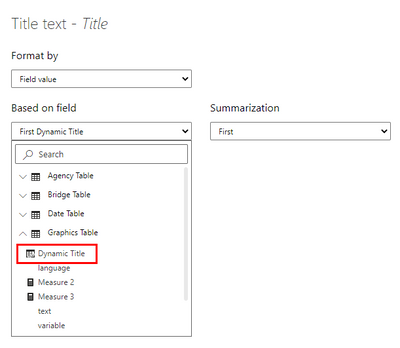
Find the new calculated column and click it.
Hope this helps.
Proud to be a Super User!
Hey @matalb,
You can create a Calculated Column using the SWITCH function:
Dynamic Title =
SWITCH (
'Graphics Table'[variable],
"1st graph title", 'Graphics Table'[text]
)
Then click on your visual, go to Title text, and click the function key.
Find the new calculated column and click it.
Hope this helps.
Proud to be a Super User!
any idea? help!
The Power BI Data Visualization World Championships is back! Get ahead of the game and start preparing now!
| User | Count |
|---|---|
| 19 | |
| 13 | |
| 10 | |
| 4 | |
| 4 |
| User | Count |
|---|---|
| 31 | |
| 28 | |
| 19 | |
| 11 | |
| 10 |