Join us at FabCon Atlanta from March 16 - 20, 2026, for the ultimate Fabric, Power BI, AI and SQL community-led event. Save $200 with code FABCOMM.
Register now!The Power BI Data Visualization World Championships is back! Get ahead of the game and start preparing now! Learn more
Hi,
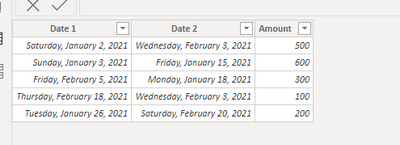
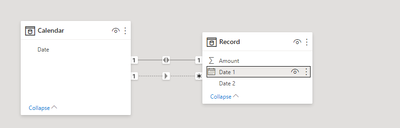
I have 1 table contains 2 different date column and one amount column. I want to create a measure to calculate the sum of amount for both date column's date before selected date.
Let's see the example below:
For I want to sum up the amount for both date column less than the select datetime (using slicer created by calendar table to select date):
Solved! Go to Solution.
Hi @winnieymh - try something like this:
Measure1 =
VAR __Dt =
SELECTEDVALUE ( [Date from Slicer] )
RETURN
CALCULATE ( SUM ( Record[Amount] ), Calendar[Date] < __Dt )
+ CALCULATE (
SUM ( Record[Amount] ),
Calendar[Date] < __Dt,
USERELATIONSHIP ( Record[Date2], Calendar[Date] )
)
Hope this helps
David
Hi @winnieymh - try something like this:
Measure1 =
VAR __Dt =
SELECTEDVALUE ( [Date from Slicer] )
RETURN
CALCULATE ( SUM ( Record[Amount] ), Calendar[Date] < __Dt )
+ CALCULATE (
SUM ( Record[Amount] ),
Calendar[Date] < __Dt,
USERELATIONSHIP ( Record[Date2], Calendar[Date] )
)
Hope this helps
David
Thank you so much, it's a very good suggestion!!
The Power BI Data Visualization World Championships is back! Get ahead of the game and start preparing now!
Check out the November 2025 Power BI update to learn about new features.
| User | Count |
|---|---|
| 20 | |
| 11 | |
| 10 | |
| 4 | |
| 4 |
| User | Count |
|---|---|
| 34 | |
| 31 | |
| 19 | |
| 12 | |
| 11 |