Join us at FabCon Atlanta from March 16 - 20, 2026, for the ultimate Fabric, Power BI, AI and SQL community-led event. Save $200 with code FABCOMM.
Register now!The Power BI Data Visualization World Championships is back! Get ahead of the game and start preparing now! Learn more
Hi,
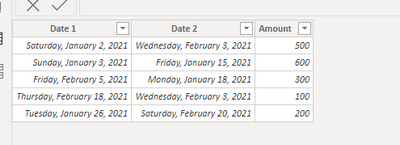
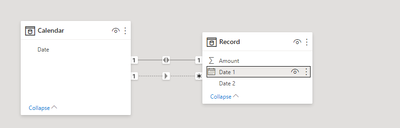
I have 1 table contains 2 different date column and one amount column. I want to create a measure to calculate the sum of amount for both date column's date before selected date.
Let's see the example below:
For I want to sum up the amount for both date column less than the select datetime (using slicer created by calendar table to select date):
Solved! Go to Solution.
Hi @winnieymh - try something like this:
Measure1 =
VAR __Dt =
SELECTEDVALUE ( [Date from Slicer] )
RETURN
CALCULATE ( SUM ( Record[Amount] ), Calendar[Date] < __Dt )
+ CALCULATE (
SUM ( Record[Amount] ),
Calendar[Date] < __Dt,
USERELATIONSHIP ( Record[Date2], Calendar[Date] )
)
Hope this helps
David
Hi @winnieymh - try something like this:
Measure1 =
VAR __Dt =
SELECTEDVALUE ( [Date from Slicer] )
RETURN
CALCULATE ( SUM ( Record[Amount] ), Calendar[Date] < __Dt )
+ CALCULATE (
SUM ( Record[Amount] ),
Calendar[Date] < __Dt,
USERELATIONSHIP ( Record[Date2], Calendar[Date] )
)
Hope this helps
David
Thank you so much, it's a very good suggestion!!
The Power BI Data Visualization World Championships is back! Get ahead of the game and start preparing now!
| User | Count |
|---|---|
| 19 | |
| 13 | |
| 9 | |
| 4 | |
| 4 |
| User | Count |
|---|---|
| 30 | |
| 26 | |
| 17 | |
| 11 | |
| 10 |